

In 2026, building a scalable business often means relying on a global talent pool. Whether you are hiring an SEO specialist in another time zone, a virtual assistant to manage your emails, or a freelance web developer, you inevitably face the same terrifying operational hurdle: How do I give them access to my business accounts without handing over the keys to my entire company?
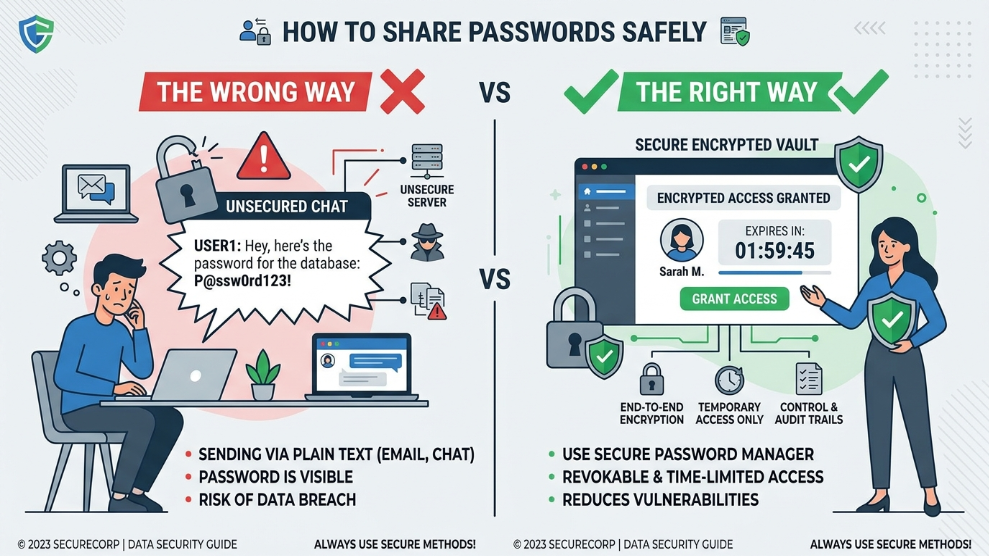
For many small business owners and agency founders, the onboarding process involves typing a sensitive password into Slack, WhatsApp, or an email thread. This is a catastrophic security mistake.
When you share credentials in plain text, you completely lose control of that data. In this guide, we will break down the critical dangers of improper password sharing and provide a foolproof, enterprise-grade strategy to manage your remote freelancers securely.
The Dangers of “Plain Text” Sharing
When you send a password via an instant messenger or email, it creates a permanent digital footprint. Even if the freelancer is 100% trustworthy, their digital environment might not be.
If you send your company’s WordPress or social media login via email, and that freelancer’s inbox is later compromised in a dark web data breach, your business is instantly exposed. Furthermore, the National Institute of Standards and Technology (NIST) consistently warns that “insider threats”—whether malicious or purely accidental—are the leading cause of corporate data leaks.
If your current method involves a shared Google Doc or utilizing a highly vulnerable system like Chrome’s built-in password manager, you need to restructure your workflow immediately.
The Solution: Role-Based Access Control (RBAC)
The golden rule of outsourcing is the “Principle of Least Privilege.” A freelancer should only have access to the exact tools they need to do their job, and only for the duration of their contract.
To achieve this effortlessly, modern businesses utilize encrypted digital vaults. Instead of telling the freelancer your password, you invite them to a secure “Shared Folder.” They can log into the necessary platforms, but they never actually see the password characters.
If you are managing a growing team of remote workers, migrating to a platform designed for B2B collaboration is essential. For instance, many agencies rely on the “Secret Key” architecture found in premium enterprise tools to create isolated, project-specific vaults. This allows you to grant access on Monday and instantly revoke it on Friday with a single click.
👉 To see how this works in a real-world business environment, read our comprehensive 1Password Review.
3 Best Practices for Offboarding Freelancers
Hiring a freelancer is only half the battle; offboarding them securely is where most businesses fail. When a contract ends, you must ensure all digital ties are severed immediately.
- Instantly Revoke Vault Access: If you used a shared digital folder, remove their email address from the access list. They will instantly be logged out of your connected accounts.
- Audit Active Sessions: Go into the settings of your social media or software accounts and click “Log out of all active sessions” to ensure they cannot access the account through an old browser cookie.
- Change the Core Passwords: Even if you used a secure sharing method, it is a strict cybersecurity best practice to rotate the passwords of the accounts the freelancer touched.
Changing multiple passwords manually can be an exhausting administrative nightmare. This is why some business owners prefer security suites that include bulk-automation features. Certain modern vaults include a “1-Click Password Changer” that automatically navigates to major websites and updates your passwords for you the moment a freelancer leaves your company.
Final Thoughts
Your business’s digital security should never rely on the honor system or an unencrypted chat app. By utilizing a dedicated, encrypted sharing environment, you can scale your remote workforce confidently. You retain total administrative control, ensuring that your freelancers have the tools they need to succeed while your core business assets remain heavily guarded.

Munir is a digital security researcher and software reviewer
with over 5 years of experience testing privacy tools, parental
control applications, and cybersecurity software. He founded
Tech Monitor Pro to provide honest, hands-on reviews that help
families and professionals make smarter decisions about the
tools they use online. When he is not testing the latest VPN
or email verification platform, he writes practical guides on
digital safety and online privacy.