

You have taken all the right precautions. You purchased a premium Virtual Private Network (VPN), cleared your browser cookies, and opened an Incognito window. You verify your IP address on a checker website, and it shows you are browsing from halfway across the world. You feel completely secure and anonymous.
Then, you log into your e-commerce dashboard or your social media ad manager, and within ten minutes, your account is permanently suspended for “suspicious activity.” How did the platform know it was you?
The answer is almost always a hidden vulnerability inside your web browser known as a WebRTC leak. Even the most expensive VPNs and proxy extensions cannot protect you from this specific type of data exposure. In this guide, we will break down what WebRTC is, how it silently bypasses your security tools, and the professional methods required to patch it.
What is WebRTC?
WebRTC stands for Web Real-Time Communication. It is an open-source project integrated into almost every modern web browser, including Google Chrome, Mozilla Firefox, Safari, and Microsoft Edge.
According to the official Mozilla Developer Network (MDN) documentation, WebRTC is designed to allow browsers to establish direct, peer-to-peer connections. This is the technology that allows you to join a Zoom call, use Discord web voice chat, or play browser-based multiplayer games without needing to download massive third-party plugins.
How Does the Leak Happen?
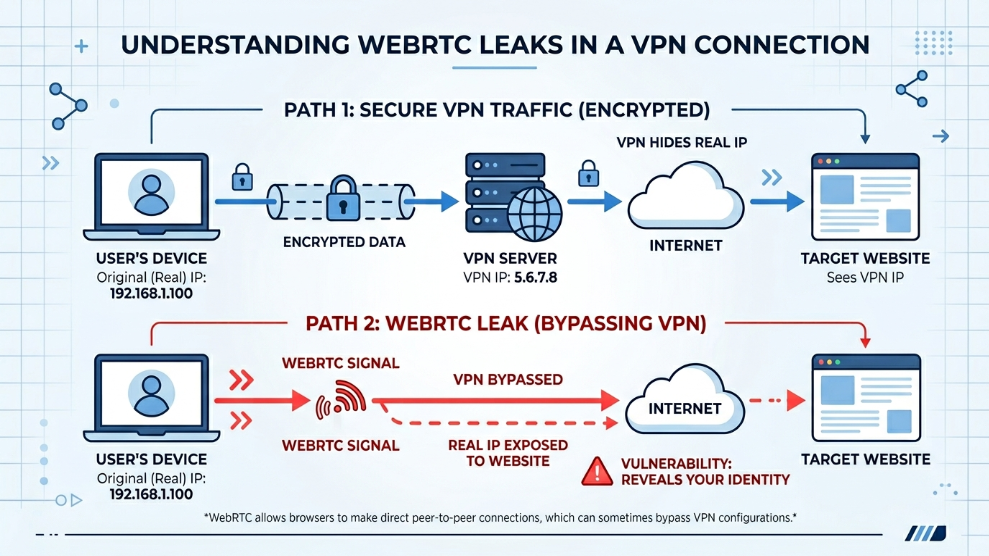
To establish a fast, high-quality audio or video connection with another user, WebRTC needs to know the absolute shortest, most direct route between your computer and theirs. To find this route, WebRTC must uncover your true local and public IP addresses.
Here is the critical flaw: WebRTC is designed to bypass proxies and VPNs. Because a VPN slows down a connection by routing it through an encrypted tunnel, WebRTC attempts to talk outside of that tunnel to ensure voice and video calls do not lag. When you visit a website with a hidden tracking script, that script can silently ping your browser’s WebRTC framework. The browser complies with the request and hands over your actual, unencrypted public IP address—completely ignoring the fact that your VPN is currently turned on.
The Threat to Digital Marketers
For casual internet users watching restricted Netflix content, a WebRTC leak is a minor privacy annoyance. But for professionals trying to manage multiple Facebook ad accounts safely, it is an operational disaster.
Advertising algorithms do not just look at the IP address your VPN provides; they actively probe your browser for WebRTC leaks. If your profile shows a New York IP address, but your WebRTC data leaks an IP address from London, the algorithm instantly flags the profile as fraudulent. Furthermore, WebRTC data is heavily used in browser fingerprinting to build a unique profile of your hardware setup.
How to Fix WebRTC Leaks
The most obvious solution seems to be disabling WebRTC entirely in your browser settings. However, if you disable it, modern websites (like Google Meet, Slack, or advanced social media dashboards) will break or refuse to load properly. Tracking algorithms also flag browsers with WebRTC disabled as highly suspicious, as regular human users rarely turn it off.
Instead of disabling it, you must “spoof” it. You need a dedicated environment that feeds the tracking script a fake—but mathematically valid—WebRTC IP address.
Professional marketers solve this by migrating away from standard browsers and utilizing anti-detect software. For example, creating a profile within GoLogin allows the software to take control of the WebRTC module. It natively binds the WebRTC output to the specific proxy you assigned to that profile. When the tracking script asks for your real IP, the browser securely hands over the proxy IP instead, effectively patching the leak without breaking the website’s functionality.
Final Thoughts
A VPN is a privacy tool, not an anonymity shield. Relying on standard consumer security tools to protect high-value digital assets is a dangerous game. By understanding the underlying mechanics of WebRTC leaks and adopting professional browser environments, you can ensure that your true identity and location remain completely hidden from aggressive tracking algorithms.

Munir is a digital security researcher and software reviewer
with over 5 years of experience testing privacy tools, parental
control applications, and cybersecurity software. He founded
Tech Monitor Pro to provide honest, hands-on reviews that help
families and professionals make smarter decisions about the
tools they use online. When he is not testing the latest VPN
or email verification platform, he writes practical guides on
digital safety and online privacy.