

If you work in digital marketing, dropshipping, or lead generation, you already know that relying on a single Facebook ad account is a massive business risk. Algorithmic bans are frequently handed out by mistake, and if your only ad account gets restricted, your entire revenue stream freezes instantly.
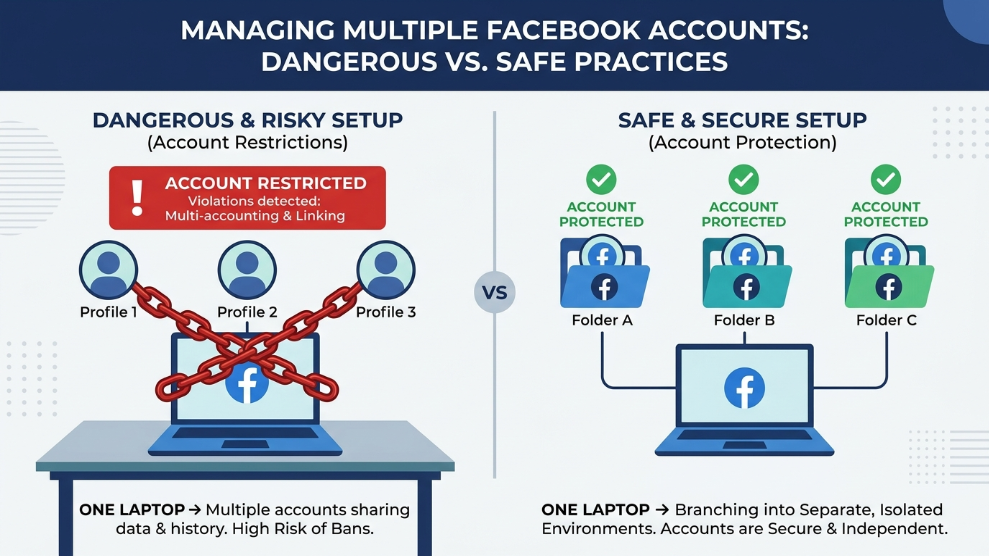
To survive and scale, media buyers must diversify. However, managing multiple Facebook ad accounts is a highly delicate operation. Meta’s AI tracking systems are incredibly aggressive. If you log into five different Business Managers from the same laptop and the same Wi-Fi network, the algorithm instantly connects the dots. If one account gets flagged for a minor policy violation, the system will trigger a chain reaction, banning all five accounts simultaneously.
To protect your marketing infrastructure, you have to break the technical links between your profiles. Here is the professional strategy for safely managing multiple advertising accounts without getting caught in the ban wave.
The Danger of “Linked” Digital Identities
When you log into an ad account, Facebook does not just check your username and password. The platform scans your IP address, your browser cookies, and the specific hardware configuration of your computer.
According to Meta’s strict Advertising Policies, circumventing their systems or operating multiple restricted assets is a severe violation. Their AI uses browser fingerprinting to ensure compliance. If you use standard methods like Google Chrome’s “Incognito Mode” or clearing your cache, you are still leaking your computer’s unique hardware fingerprint. To the algorithm, it is glaringly obvious that the same person is operating all the accounts.
Step 1: Isolate Your Hardware Fingerprint
The absolute most critical step in managing multiple accounts is ensuring that each account lives in its own completely isolated digital environment.
You cannot use a standard web browser. Professional media buyers utilize specialized anti-detect browsers to create secure, independent profiles. For instance, many Facebook ad agencies rely heavily on Dolphin Anty because its user interface is specifically designed for social media operations. It allows you to create dozens of isolated browser windows, assigning a completely fake, unique hardware fingerprint to each one. To Facebook’s AI, opening three different profiles looks exactly like three different physical laptops located in completely different cities.
Step 2: Utilize Dedicated Residential Proxies
Hiding your hardware is only half the battle; you must also hide your internet connection. If five unique laptops are all connecting from the exact same home Wi-Fi router (the same IP address), the platform will flag the activity as highly suspicious.
Never use a standard, commercial VPN to manage ad accounts. VPN IPs are public, heavily abused, and actively blacklisted by social media platforms. Instead, you must attach a dedicated “Residential Proxy” to each isolated browser profile. A residential proxy routes your connection through a real physical household internet provider (like AT&T or Comcast). This ensures that each of your ad accounts has a completely clean, normal-looking IP address that matches the geographical location of the profile.
Step 3: Automate the Warm-Up Process
If you purchase a new ad account or create a fresh profile, you cannot immediately launch a $500/day ad campaign. A brand new account showing aggressive advertising behavior is an immediate red flag. You must “warm up” the account by acting like a normal human user—scrolling the newsfeed, liking pages, and clicking on random posts for several days.
When managing dozens of accounts, doing this manually is impossible. To scale safely, marketers use high-end workflow automation. For example, utilizing the robotic process automation (RPA) features found within AdsPower allows you to program the browser to automatically scroll and interact with Facebook pages across fifty different accounts simultaneously. This builds a highly trusted, seasoned cookie history without requiring any manual human labor.
Final Thoughts
Managing multiple Facebook ad accounts safely requires military-grade digital hygiene. You must treat every single account as an entirely separate business entity. By isolating your hardware fingerprints, using high-quality residential proxies, and properly warming up your profiles, you can build an unshakeable advertising infrastructure that survives algorithmic updates and keeps your revenue flowing.

Munir is a digital security researcher and software reviewer
with over 5 years of experience testing privacy tools, parental
control applications, and cybersecurity software. He founded
Tech Monitor Pro to provide honest, hands-on reviews that help
families and professionals make smarter decisions about the
tools they use online. When he is not testing the latest VPN
or email verification platform, he writes practical guides on
digital safety and online privacy.