

Whenever you navigate the internet, your web browser acts as your digital ambassador. Before a website even loads its first image or line of text, your browser politely introduces itself to the website’s server. It tells the server exactly what kind of device you are using, so the website knows whether to send you the desktop version or the mobile version of the page.
This introduction is made using a small line of code known as a User-Agent (UA) string.
While this sounds like a harmless structural feature of the internet, it is actually one of the primary data points advertising platforms use to track, categorize, and ban digital marketers. If you are scraping competitor data, verifying ad placements, or managing multiple accounts, mastering User-Agent spoofing is a non-negotiable skill. Here is a technical breakdown of how it works and why basic spoofing methods are getting marketers banned.
What is a User-Agent String?
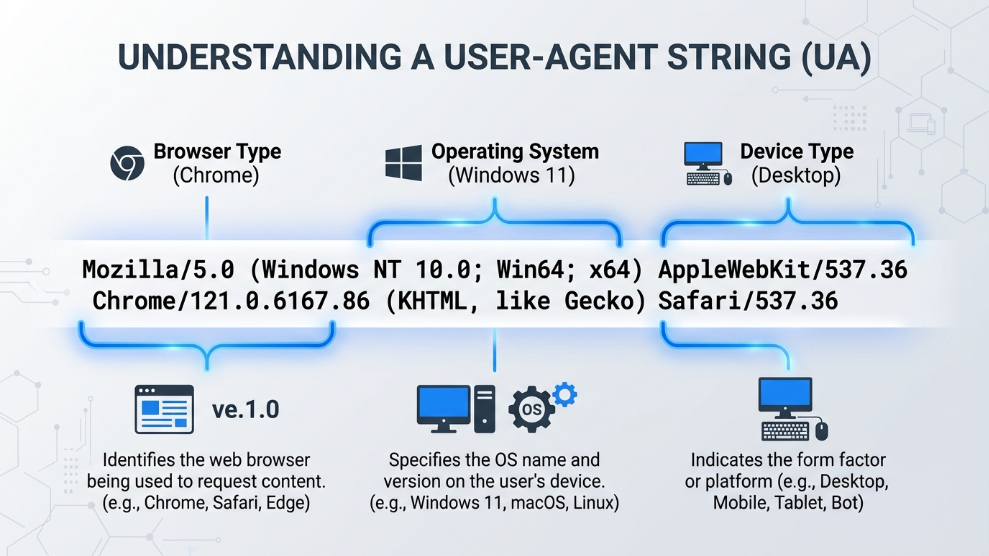
According to the official web documentation by the Mozilla Developer Network (MDN), a User-Agent is a characteristic string that lets servers and network peers identify the application, operating system, vendor, and version of the requesting user.
If you are using Google Chrome on a Windows PC, your UA string looks something like this: Mozilla/5.0 (Windows NT 10.0; Win64; x64) AppleWebKit/537.36 (KHTML, like Gecko) Chrome/114.0.0.0 Safari/537.36
In one split second, you have told the website your exact operating system (Windows 10/11, 64-bit) and your exact browser version (Chrome 114).
Why Digital Marketers Need to Spoof It
Digital professionals manipulate this string for several strategic reasons:
- Competitor Ad Verification: If you want to see what mobile ads your competitors are running on TikTok or Instagram, but you are sitting at a desktop computer, you can spoof your User-Agent to mimic an iPhone 14. The website will serve you the mobile layout and mobile-specific ad campaigns.
- Web Scraping: If you are scraping pricing data from an e-commerce competitor, sending 5,000 requests from a single “Windows Desktop Chrome” UA string will instantly trigger their anti-bot security. By rotating your User-Agent to mimic hundreds of different mobile and desktop devices, you appear as thousands of organic human visitors.
- Multi-Accounting: When trying to run multiple TikTok accounts on one PC, broadcasting the exact same desktop UA string across thirty accounts is an immediate red flag. You must spoof the string to replicate various mobile phones to bypass algorithmic suspicion.
The Danger of Basic Chrome Extensions
If you search the Google Chrome store, you will find dozens of free “User-Agent Switcher” extensions. Beginners often install these, switch their UA to “Macbook Safari,” and assume they are anonymous. This is a fatal operational mistake.
A UA string is only one tiny piece of your overall browser fingerprint. If your free extension tells Facebook that you are using a Macbook Safari browser, but Facebook’s background script checks your actual hardware and sees a Windows-specific graphics card driver, the mismatch is glaringly obvious. The algorithm instantly knows you are a bot or a fraudster attempting to hide your identity, leading to an immediate account suspension.
How to Spoof Properly
To spoof a User-Agent safely, you must change your entire hardware fingerprint to logically match the new string.
You cannot achieve this with a free browser extension. You must use a professional anti-detect environment. High-end automation platforms like AdsPower are built specifically for this logic. When you select an iPhone User-Agent within the software, it doesn’t just change the string; it automatically alters your screen resolution, operating system metrics, and touch-screen capabilities to perfectly match the profile of a real iPhone. This ensures that when the platform cross-references your hardware data, everything aligns perfectly, and no security alarms are triggered.
Final Thoughts
User-Agent spoofing is a powerful tactic for scraping data, testing ad layouts, and managing massive digital campaigns. However, faking your introduction is useless if the rest of your digital identity gives you away. By abandoning basic extensions and relying on logically consistent anti-detect browsers, you can safely manipulate your User-Agent and scale your operations without exposing your true digital footprint.

Munir is a digital security researcher and software reviewer
with over 5 years of experience testing privacy tools, parental
control applications, and cybersecurity software. He founded
Tech Monitor Pro to provide honest, hands-on reviews that help
families and professionals make smarter decisions about the
tools they use online. When he is not testing the latest VPN
or email verification platform, he writes practical guides on
digital safety and online privacy.