

When you transition from a beginner affiliate to a high-volume media buyer, your biggest bottleneck stops being ad budget and starts being account management. Managing five Facebook Ad accounts manually is difficult; managing fifty is practically impossible without getting banned by algorithmic tracking.
In my own journey of scaling traffic arbitrage and e-commerce campaigns, I realized that just hiding my IP address wasn’t enough. I needed a way to automate the tedious tasks of warming up accounts, farming profiles, and managing hundreds of unique digital identities simultaneously. This is exactly where AdsPower enters the conversation.
While tools like GoLogin are fantastic for straightforward, user-friendly profile management, AdsPower is built for heavy-duty scaling and automation. In this in-depth AdsPower review, we will strip down its unique dual-browser engines, test its legendary RPA capabilities, and see if it is the right tool for your multi-accounting empire.
AdsPower Pricing Overview
AdsPower utilizes a highly customized pricing model. Instead of rigid tiers, you pay based on the exact number of profiles and team seats you need. This makes it incredibly cost-effective whether you are running 10 profiles or 10,000. They also offer a permanently Free plan for basic testing.
| Plan Type | Monthly Cost (Billed Annually) | Key Features Included |
| Free | $0.00 | 2 Profiles, basic fingerprint control. |
| Base | Starts at $5.40/mo | Up to 50 profiles, 1 user seat, RPA features (paid add-on). |
| Pro | Starts at $30.00/mo | Up to 100 profiles, multiple user seats, advanced API, recycle bin. |
| Custom | Negotiable | 10,000+ profiles, dedicated success manager, custom infrastructure. |
Click here to check current AdsPower pricing and customize your plan
Key Specifications
| Feature | Specification Details |
| Browser Engines | SunBrowser (Chromium) & FlowerBrowser (Firefox) |
| Automation Engine | Native RPA (Robotic Process Automation) |
| Bulk Management | Yes (Import/Export via Excel/CSV) |
| API Support | Local API available on all paid plans |
| Proxy Protocols | HTTP, HTTPS, SOCKS5, Luminati, IPVanish |
| Platforms Supported | Windows, macOS |
Detailed Technical Features
Dual Engines: SunBrowser and FlowerBrowser
Most anti-detect tools force you to use a Chromium-based engine. While Chromium is great, modern tracking algorithms can sometimes spot anomalies if every single profile in a massive farm uses the exact same core architecture. AdsPower solves this by offering two distinct engines: SunBrowser (based on Chrome) and FlowerBrowser (based on Firefox). By mixing and matching these engines across your profiles, you create a significantly more diverse and natural-looking digital footprint, drastically reducing your ban rates.
The Game-Changer: Native RPA Automation
This is the feature that makes AdsPower an absolute powerhouse for scaling operations. RPA (Robotic Process Automation) allows you to automate repetitive tasks without needing to write a single line of Python code.
If you buy fresh social media accounts, you know you cannot run ads immediately; you have to “warm them up” by scrolling, liking posts, and acting like a normal human for a few days. With AdsPower’s RPA, you can select 50 profiles, apply a “Warm-up Template,” and hit run. The software will automatically open the browsers, scroll through feeds, click on random posts, and build a localized cache history for every single profile completely on autopilot. It is like having a team of virtual assistants working for free.
Bulk Import and Proxy Management
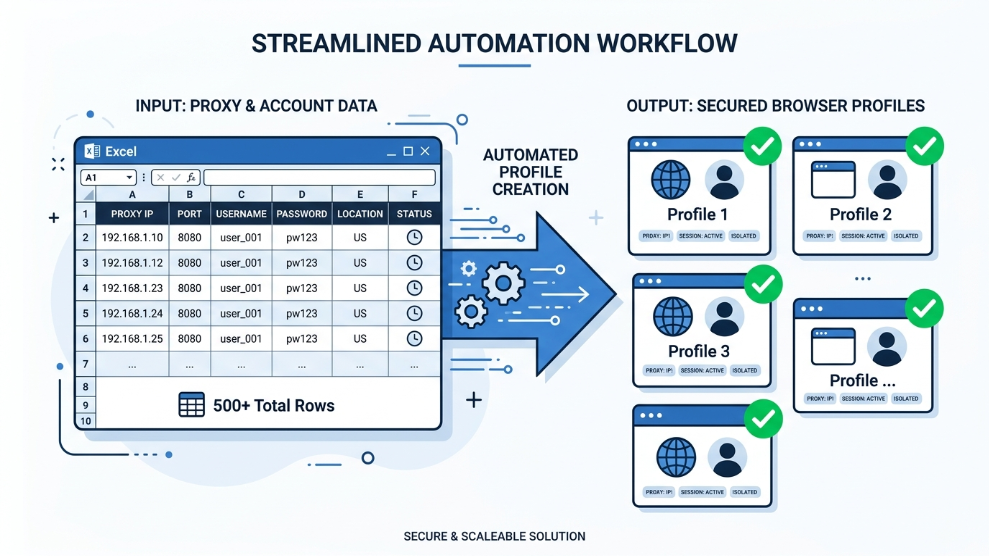
When dealing with massive volume, creating profiles one by one is a waste of time. AdsPower excels at bulk management. You can format a simple Excel spreadsheet with your account logins, passwords, and specific proxy IPs, and upload it directly into the dashboard. Within seconds, AdsPower generates hundreds of isolated, secure profiles ready to launch.
Who is AdsPower Best For?
AdsPower is strictly designed for high-volume digital marketers and automation experts. If you are a crypto enthusiast farming hundreds of airdrops, an agency running massive Facebook and TikTok ad operations, or an Amazon FBA seller managing multiple regional storefronts, this tool is built for your workflow.
Because it handles credentials locally and supports granular team permissions, it allows agency owners to hire virtual assistants and securely grant them access to specific ad accounts without exposing the master passwords or triggering geographic login blocks.
However, if you are a solo entrepreneur who only needs to manage three or four accounts and wants the absolute simplest user interface, the sheer number of features in AdsPower might feel a bit overwhelming at first glance.
Pros of AdsPower
- ✓ The RPA feature saves hundreds of hours of manual account warm-up.
- ✓ Dual browser engines (Chromium & Firefox) provide superior fingerprint diversity.
- ✓ Highly flexible pricing model scales directly with your business size.
- ✓ Flawless bulk import and export capabilities for massive account farms.
- ✓ Local API allows for advanced custom coding and integration.
Cons of AdsPower
- ✗ The user interface is highly technical and has a steeper learning curve than competitors.
- ✗ Mac version can occasionally be resource-heavy when running dozens of profiles simultaneously.
Final Verdict
To put it simply: AdsPower is not just a browser; it is a full-scale digital farm management system. While other tools focus purely on hiding your identity, AdsPower goes a step further by automating the actual grunt work required to keep those identities active and profitable.
If you are ready to graduate from manually managing a handful of accounts to running a fully automated, ban-resistant media buying operation, AdsPower is undeniably one of the most powerful tools available on the market today.
Scale Your Campaigns Automatically with AdsPower

Munir is a digital security researcher and software reviewer
with over 5 years of experience testing privacy tools, parental
control applications, and cybersecurity software. He founded
Tech Monitor Pro to provide honest, hands-on reviews that help
families and professionals make smarter decisions about the
tools they use online. When he is not testing the latest VPN
or email verification platform, he writes practical guides on
digital safety and online privacy.