

Imagine giving every single person who walks into a massive corporate office the master key to the building. The receptionist, the marketing intern, the IT director, and the freelance graphic designer can all unlock the front door, the server room, and the CEO’s private office.
In the physical world, this sounds completely insane. Yet, in the digital world, small businesses make this exact mistake every single day by giving all their employees universal access to shared passwords, cloud storage, and client databases.
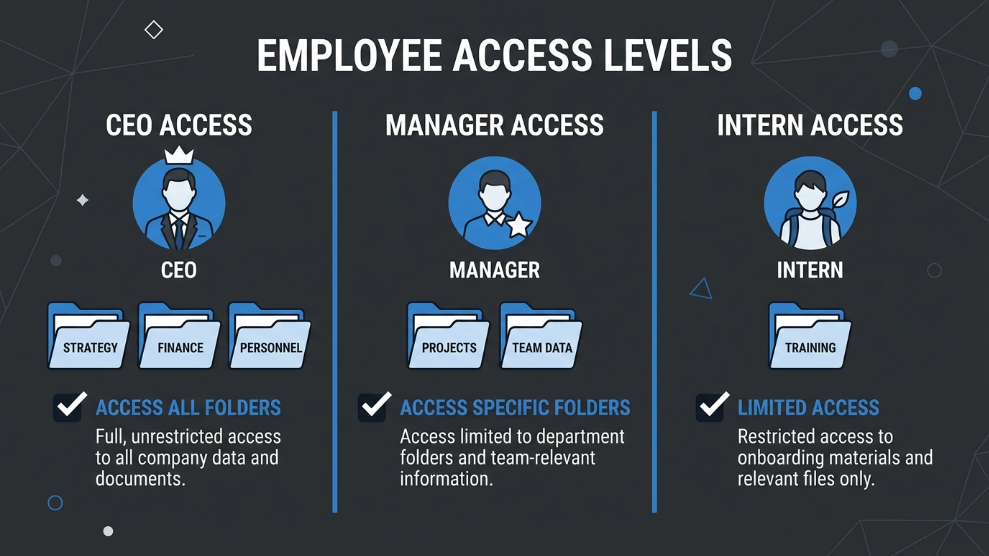
To stop internal data leaks and secure your company’s digital infrastructure, you need a system that restricts access based on necessity. In the cybersecurity industry, this system is called Role-Based Access Control (RBAC). If you are a business owner or an IT beginner, here is a simple breakdown of how RBAC works and why you need to implement it immediately.
What is Role-Based Access Control?
At its core, Role-Based Access Control is a security paradigm that restricts network or system access based on the role of the individual user within an enterprise.
According to the National Institute of Standards and Technology (NIST), RBAC ensures that employees are only granted the permissions necessary to perform their specific job duties. This concept is widely known as the “Principle of Least Privilege.”
Under an RBAC system, access is not assigned to a specific person (like John or Sarah); it is assigned to a role (like “Junior Marketer” or “Senior Accountant”). When John is hired as a Junior Marketer, he inherits the access rights of that role. If he gets promoted, his role changes in the system, and his access permissions automatically adjust.
Why Small Businesses Need RBAC
Many startups and small agencies operate on a “flat” structure where everyone trusts each other, often sharing a single login for social media tools or software subscriptions. However, as the business scales, this trust-based model becomes a massive security liability.
1. Preventing Accidental Data Loss
Not all data breaches are caused by malicious hackers. Often, an untrained intern might accidentally delete a critical client database because they had administrative access they never actually needed. RBAC prevents these costly human errors by locking down sensitive areas of your software.
2. Simplifying the Exit Process
When an employee resigns, hunting down every software tool they had access to is a logistical nightmare. If you use RBAC, offboarding employees becomes incredibly safe and efficient. You simply remove their profile from the system, and their role-based access is instantly disabled across the entire company network.
How to Implement RBAC in Your Business
Implementing an access control system does not require you to build custom software. Today, modern B2B security tools have this architecture built directly into their platforms. The easiest way to deploy RBAC is through an enterprise-grade digital vault.
If you handle highly classified client data and need military-grade infrastructure, you can utilize platforms like Keeper Security to set up strict organizational units. It allows founders to create highly granular permissions, ensuring that team members can automatically autofill a password for a specific client portal without ever actually seeing the hidden password characters.
On the other hand, if your priority is smooth collaboration among remote teams, 1Password is highly regarded for its intuitive team-sharing features. You can easily create distinct digital vaults (e.g., “Marketing Vault,” “Finance Vault”) and assign specific roles to your employees, giving you complete visibility over who has access to which accounts.
Final Thoughts
You would never hand the keys to your company’s physical safe to a brand-new employee on their first day. Your digital assets deserve the exact same level of protection. By understanding and implementing Role-Based Access Control, you eliminate the risks of over-privileged accounts, protect your clients’ sensitive data, and build a scalable security foundation for your growing business.

Munir is a digital security researcher and software reviewer
with over 5 years of experience testing privacy tools, parental
control applications, and cybersecurity software. He founded
Tech Monitor Pro to provide honest, hands-on reviews that help
families and professionals make smarter decisions about the
tools they use online. When he is not testing the latest VPN
or email verification platform, he writes practical guides on
digital safety and online privacy.