
If you are deeply embedded in the Apple ecosystem, you probably love the seamless magic of iCloud Keychain. It is undeniably satisfying to open your MacBook, navigate to a website, and watch Safari instantly fill in your login credentials via Face ID or Touch ID. It feels like the ultimate combination of luxury and security.
Apple has built a reputation for prioritizing user privacy, and according to Apple’s official security documentation, Keychain data is end-to-end encrypted. So, if the encryption is solid, why do cybersecurity experts in 2026 strongly advise against using it as your primary digital vault?
The problem with iCloud Keychain is not the cryptography—it is the architecture. By tying your most sensitive passwords directly to your device’s basic passcode, you are creating a massive, often overlooked vulnerability. Here is why relying solely on Apple’s built-in password manager could compromise your digital life, and what you should be doing instead.
The “Single Point of Failure” Flaw
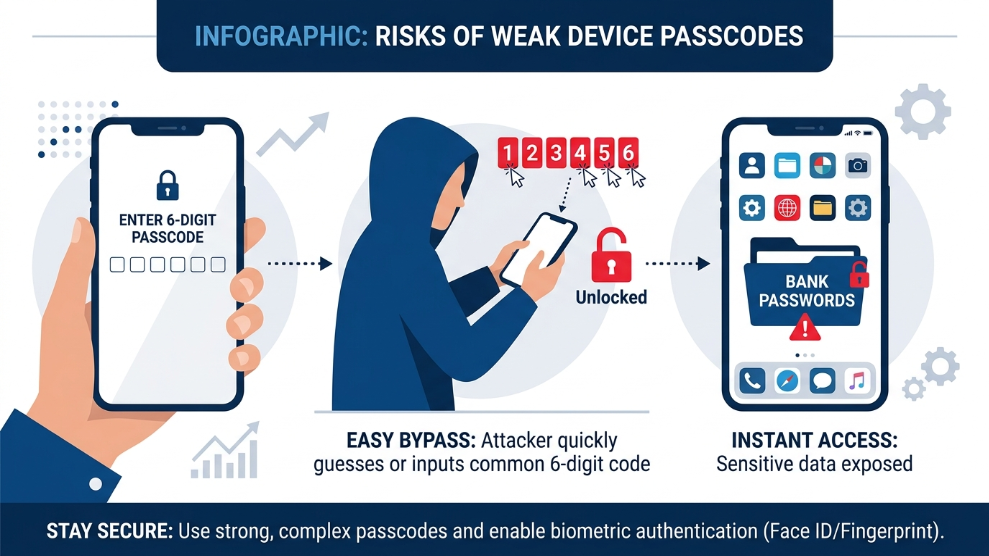
The most glaring iCloud Keychain vulnerability is how access is granted. In the vast majority of cases, the only thing protecting your Keychain passwords is your iPhone’s 6-digit passcode or your Mac’s login password.
Imagine you are at a crowded café or a bar. A thief watches over your shoulder (a tactic known as “shoulder surfing”) and memorizes your 6-digit iPhone passcode as you unlock your device. Moments later, they steal your phone.
Because they know your passcode, they do not just have your physical device; they have immediate, unrestricted access to your entire iCloud Keychain. They can instantly log into your banking apps, email accounts, and cryptocurrency wallets. By the time you realize your phone is gone and attempt to lock it remotely, the financial damage has already been done.
Dedicated password managers eliminate this risk by requiring a completely separate, complex Master Password that is never used to unlock the physical device itself.
The Cross-Platform Nightmare
In 2026, very few people use exclusively one brand of technology. You might have an iPhone, a Windows PC at work, and an Android tablet at home.
iCloud Keychain is designed to keep you trapped inside Apple’s walled garden. Trying to access your Safari-saved passwords on a Windows machine or an Android device is a frustrating, clunky experience. This friction leads to dangerous digital habits. When users cannot easily access their secure passwords on a different operating system, they often resort to using weak, memorable passwords or writing them down on sticky notes—completely defeating the purpose of a secure vault.
The Solution: Upgrading to True Zero-Knowledge Vaults
To truly secure your digital identity across all devices, you need a standalone password manager that operates independently of your phone’s basic lock screen. Here are two premium alternatives that solve the Keychain vulnerability:
1. 1Password: The Ultimate Dual-Layer Defense
If you want to ensure that a stolen device does not equal a stolen identity, 1Password is the industry gold standard. It uses a unique 34-character “Secret Key” alongside your Master Password. Even if a thief steals your unlocked iPhone, they cannot access your 1Password vault without the Master Password, which is kept entirely separate from your device’s 6-digit PIN. Furthermore, 1Password works flawlessly across Apple, Windows, and Android ecosystems.
👉 Read our complete, expert review of 1Password here
2. NordPass: Blazing Fast Cross-Platform Security
If you want the convenience of Face ID combined with superior encryption, NordPass is a phenomenal upgrade. Powered by advanced XChaCha20 encryption, it operates independently of your iCloud account. Whether you are switching from your MacBook to a Windows desktop, NordPass syncs your passwords instantly and securely, ensuring you are never locked out of your accounts just because you switched devices.
👉 Read our detailed review of NordPass here
Final Verdict
Apple’s iCloud Keychain is incredibly convenient, but convenience is often the enemy of security. Relying on a 6-digit device passcode to protect your life savings, private emails, and sensitive corporate data is a risk you cannot afford to take in 2026.
By upgrading to a dedicated, cross-platform password manager, you build an impenetrable wall between your physical devices and your most valuable digital assets.

Munir is a digital security researcher and software reviewer
with over 5 years of experience testing privacy tools, parental
control applications, and cybersecurity software. He founded
Tech Monitor Pro to provide honest, hands-on reviews that help
families and professionals make smarter decisions about the
tools they use online. When he is not testing the latest VPN
or email verification platform, he writes practical guides on
digital safety and online privacy.