

A few years ago, if you wanted to generate passive income through mobile applications—whether it was running crypto airdrop bots, automating social media engagement, or farming in-game currency—you had to build a physical “phone farm.”
This involved buying dozens of cheap, second-hand Android phones, laying them out on a massive wire rack, and connecting them all to a maze of USB charging hubs. While the concept of generating automated revenue was highly appealing, the physical reality of maintaining that hardware was a nightmare.
Today, the digital automation industry has evolved. You no longer need to turn your spare bedroom into a fire hazard. Here is the modern blueprint on how to start phone farming at scale without ever purchasing a single piece of physical hardware.
The Dangers of Physical Phone Farms
Before exploring the modern solution, it is vital to understand why the industry abandoned physical setups. Running mobile applications 24/7 on cheap smartphones creates severe operational hazards:
- Battery Degradation and Fire Risks: Smartphones are not designed to be plugged into a charger and run at 100% CPU capacity for weeks on end. According to the battery science experts at Battery University, extreme heat and continuous high-voltage charging degrade lithium-ion batteries rapidly, leading to “battery bloat” (swelling) and, in worst-case scenarios, spontaneous fires.
- Bandwidth Bottlenecks: Connecting 50 physical phones to a single home Wi-Fi router will instantly crash the network. Your internet service provider (ISP) will likely throttle your connection or flag your activity.
- The Maintenance Nightmare: In a physical farm, phones randomly disconnect from the Wi-Fi, apps crash, and screens freeze. You have to physically walk over to the rack and manually restart devices constantly.
The Solution: Cloud Phone Farming
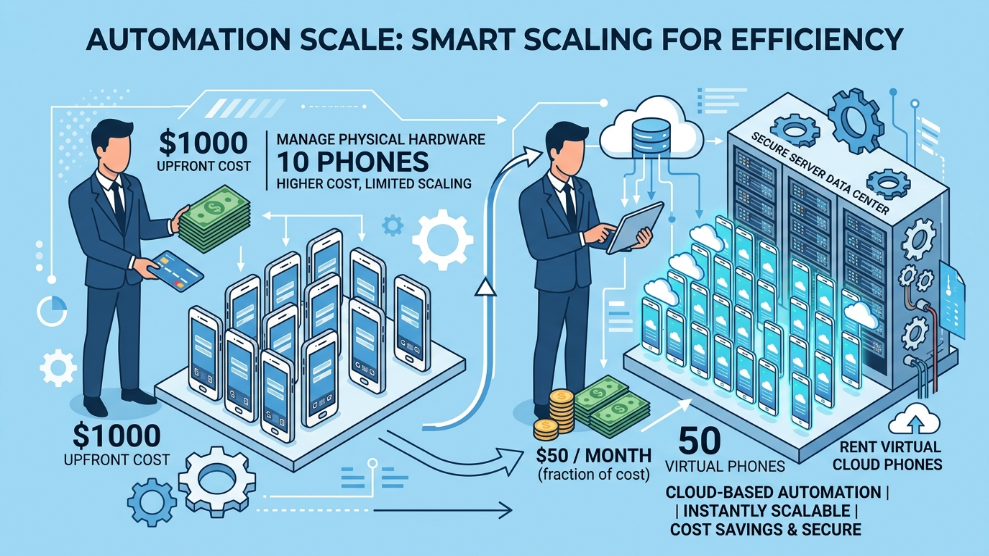
To bypass these hazards, professional marketers have completely transitioned to virtual infrastructure. Instead of buying a physical device, you rent a “Cloud Phone.”
A cloud phone is a virtualized Android operating system running on a massive server in a secure data center. You access it via a desktop client on your laptop. You are merely viewing a live video stream of the phone, while the heavy processing, internet downloading, and 24/7 running are handled entirely by the remote server.
Step 1: Choose Your Budget Infrastructure
If you are just learning how to start phone farming, your first priority is keeping your overhead costs low. If you are running simple tasks like an auto-clicker for a crypto airdrop, you do not need an expensive device with 8GB of RAM.
For mass scalability on a budget, marketers utilize platforms like LDC Cloud Phone. Because they offer stripped-down, bloatware-free Android environments, you can rent multiple virtual devices for the same price it would cost to buy a single premium physical phone. This allows you to build a farm of 20 or 50 virtual devices instantly without a massive upfront capital investment.
Step 2: Utilize Synchronous Group Control
Once you have 50 virtual phones running in the cloud, how do you manage them? Opening 50 different windows and manually clicking “Install App” on each one is just as exhausting as managing physical phones.
The secret to massive scaling is automation software specifically built for cloud environments. For example, the BitBrowser Cloud Phone ecosystem features a tool called “Synchronous Group Control.” You designate one of your cloud phones as the “Master.” Whatever action you perform on that master phone—swiping, typing a password, or opening a game—is instantaneously replicated across all other 49 virtual phones. This allows you to command an entire phone farm with a single click.
Final Thoughts
The era of tangled USB cables and overheating batteries is officially over. By leveraging affordable cloud Android environments and utilizing synchronous control software, you can build a massive, 24/7 automated phone farm from a single laptop. Cloud farming eliminates the physical risks, drastically lowers your startup costs, and allows you to scale your digital operations to levels that were previously impossible.

Munir is a digital security researcher and software reviewer
with over 5 years of experience testing privacy tools, parental
control applications, and cybersecurity software. He founded
Tech Monitor Pro to provide honest, hands-on reviews that help
families and professionals make smarter decisions about the
tools they use online. When he is not testing the latest VPN
or email verification platform, he writes practical guides on
digital safety and online privacy.