

With an astonishing open rate of nearly 98%, WhatsApp has become the holy grail of direct-response digital marketing. Whether you are an e-commerce brand sending abandoned cart recovery messages, a real estate agent sending property alerts, or an affiliate marketer pushing a new campaign, no other channel commands the same level of instant human attention.
However, scaling this channel is incredibly difficult. If you load 5,000 contacts into a generic bulk-messaging software on your PC and press “Send,” your business number will be permanently banned within five minutes.
To run mass campaigns without destroying your digital assets, professional marketers have completely rebuilt their infrastructure. Here is the exact technical blueprint on how to automate WhatsApp marketing safely using cloud Android phones.
The Danger of the “Spam” Ban
WhatsApp is deeply protective of its user experience. According to the official WhatsApp Help Center guidelines on unauthorized automated messaging, the platform uses advanced machine learning technology to detect and ban accounts that engage in bulk or automated messaging.
How do they catch you?
- Speed: Human beings do not type and send 100 messages a second.
- Hardware: If you use a desktop emulator or a single physical phone to manage 20 different WhatsApp accounts via cloning apps, the algorithm instantly detects the overlapping hardware footprint.
- Network: Sending massive volume from a single data center IP or a standard home Wi-Fi router triggers immediate spam filters.
Step 1: Decentralize Your Accounts via Cloud Phones
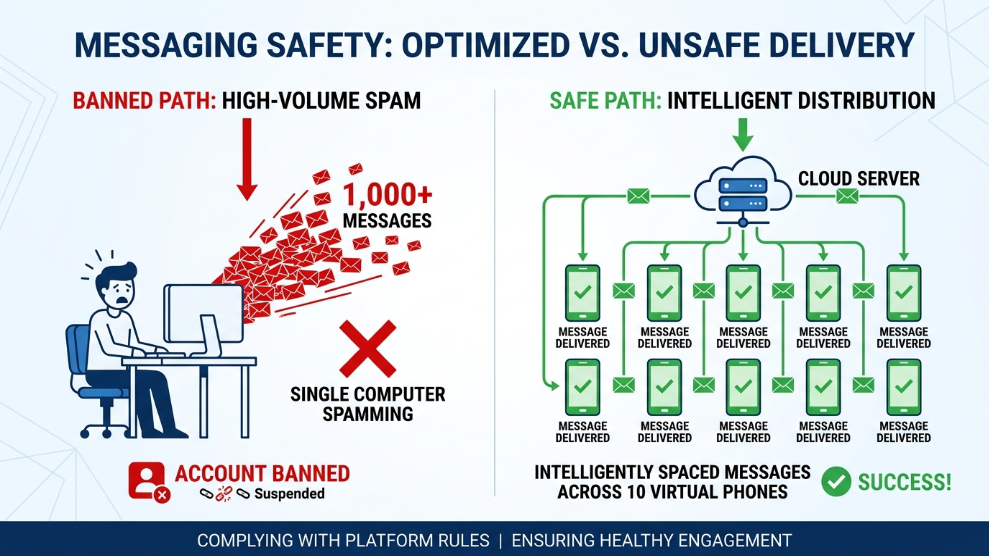
The golden rule of WhatsApp marketing is decentralization. Instead of sending 5,000 messages from one number, you should send 100 messages each from 50 different numbers.
To do this without buying 50 physical smartphones, you must use cloud mobile infrastructure. Setting up a fleet of devices is highly cost-effective and secure. For instance, using BitBrowser Cloud Phone allows you to instantly spin up 50 isolated virtual Android environments. Because these are native Android systems running on remote servers, WhatsApp reads them as 50 completely distinct, physical cell phones scattered across the country.
Step 2: Utilize Synchronous Group Control
Once you have your 50 cloud phones, you need a way to manage them. Typing out promotional messages on 50 different screens manually defeats the purpose of automation.
Premium cloud providers offer “Synchronous Group Control.” You can set up your marketing message on Phone #1 (the Master phone). With synchronization turned on, the software perfectly replicates your taps, keyboard strokes, and media uploads across the other 49 phones simultaneously. This allows you to launch massive, decentralized campaigns with a single click.
Step 3: Implement 24/7 AFK Auto-Responders
Marketing is not just about sending the initial broadcast; it is about capturing the reply. When a customer responds to your automated message at 3:00 AM, you need an auto-responder to capture that lead or send the affiliate link instantly.
If you run an auto-responder on your local PC or a physical phone, you risk the device going to sleep, losing Wi-Fi, or running out of battery. By deploying your WhatsApp bots inside an environment like Redfinger Cloud Phone, the application runs 24/7 Away From Keyboard (AFK). Your cloud phone never sleeps, ensuring your automated sales funnels operate flawlessly around the clock without any local hardware dependency.
Step 4: IP Isolation
Never forget the network layer. Ensure that every single cloud phone instance is assigned its own dedicated residential proxy. If 50 cloud phones try to connect to the WhatsApp servers using the exact same IP address, the algorithmic ban will be swift and permanent.
Final Thoughts
Automating WhatsApp marketing is highly lucrative, but it requires playing a strict game of digital stealth. By abandoning risky desktop software and local emulators in favor of isolated, proxy-protected cloud Android phones, you can distribute your marketing volume safely, bypass strict spam filters, and unlock the highest-converting communication channel on the internet.

Munir is a digital security researcher and software reviewer
with over 5 years of experience testing privacy tools, parental
control applications, and cybersecurity software. He founded
Tech Monitor Pro to provide honest, hands-on reviews that help
families and professionals make smarter decisions about the
tools they use online. When he is not testing the latest VPN
or email verification platform, he writes practical guides on
digital safety and online privacy.