

When most people want to search for something privately, log into a secondary social media account, or look up a flight without triggering targeted ads, they immediately open a new “Incognito” or “Private Browsing” window. The dark theme and the spy-glasses icon give users a comforting sense of absolute anonymity.
Unfortunately, this sense of security is a complete illusion.
While private browsing features are useful for sharing a computer with a family member, they do absolutely nothing to protect you from the outside world. If you are managing digital businesses, relying on this feature can lead to immediate account bans. Here is the technical reality of why incognito mode doesn’t actually hide your identity, and who is still watching your every move.
What Incognito Mode Actually Does
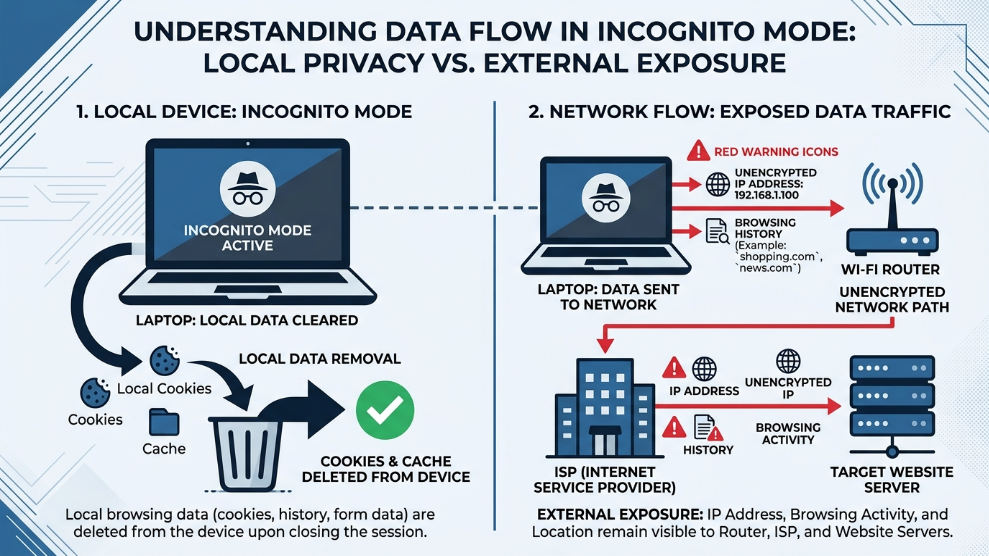
To understand why it fails, you must understand its actual purpose. Incognito mode is strictly a local privacy tool.
When you open a private window, your browser simply agrees not to save your search history, cookies, site data, or form inputs to your computer’s hard drive after you close the window. That is it. It prevents the next person who sits down at your physical computer from seeing what you were doing.
According to Google Chrome’s official Help Center, going incognito does not hide your browsing from your internet service provider, your employer, or the websites you visit. Your internet traffic remains completely exposed.
Who Can Still See Your Activity?
When you browse in private mode, several entities still have a front-row seat to your digital footprint:
- Your Network Administrator: If you are connected to your office Wi-Fi, your school network, or even a public coffee shop router, the network administrator can see every single website you visit. Incognito mode does not encrypt your traffic.
- Your Internet Service Provider (ISP): Your ISP routes all your internet traffic. They log your DNS requests and know exactly which servers you are connecting to, regardless of your browser’s private mode.
- The Websites You Visit: When you visit a website in incognito mode, the site still logs your real IP address and tracks your activity during that specific session.
The Danger for Digital Marketers
For affiliate marketers and media buyers, the misunderstanding of private browsing can be financially devastating. Many beginners try to run multiple Facebook or Google ad accounts by simply opening a new incognito tab for each account.
Because incognito mode does not hide your hardware, these platforms instantly utilize browser fingerprinting to read your computer’s exact graphics card, operating system, and screen resolution. The algorithm immediately sees that the exact same computer is logging into multiple restricted accounts, resulting in instant algorithmic suspensions.
How to Actually Hide Your Identity
If you want true digital anonymity, you must replace the illusion of incognito mode with actual security infrastructure.
- To Hide Your Traffic: You must use a premium Virtual Private Network (VPN) or a proxy. This encrypts your data connection, hiding your activity from your ISP and network administrators while changing your public IP address.
- To Hide Your Hardware: If you need to manage multiple digital identities safely, you must use an anti-detect browser. Instead of simply deleting cookies, platforms like AdsPower create deeply isolated digital environments. They spoof your hardware fingerprint and assign dedicated IP addresses to each profile, ensuring that websites cannot link your various accounts together.
Final Thoughts
Incognito mode is an excellent tool for keeping your search history hidden from your roommate or your spouse. However, it is entirely useless as a cybersecurity or anonymity tool. By understanding the severe limitations of private browsing, you can stop relying on false security and upgrade to the encryption and spoofing tools required to truly protect your digital footprint.

Munir is a digital security researcher and software reviewer
with over 5 years of experience testing privacy tools, parental
control applications, and cybersecurity software. He founded
Tech Monitor Pro to provide honest, hands-on reviews that help
families and professionals make smarter decisions about the
tools they use online. When he is not testing the latest VPN
or email verification platform, he writes practical guides on
digital safety and online privacy.