

When discussing online privacy, the conversation usually revolves around deleting cookies, hiding your IP address, or using a private browsing window. However, the world’s most sophisticated tracking algorithms have moved far beyond these basic identifiers.
If you manage multiple high-value digital assets—such as e-commerce storefronts or advertising dashboards—you are likely being tracked by an invisible, highly accurate technology known as canvas fingerprinting. This method does not rely on storing files on your computer; instead, it uses your own computer’s hardware against you to create a permanent, unique digital identity.
In this guide, we will break down the exact mechanics of canvas fingerprinting, why standard ad-blockers fail to stop it, and how professionals successfully bypass it.
What is Canvas Fingerprinting?
To understand canvas fingerprinting, you first need to understand a basic feature of modern web design. Almost all modern websites use HTML5. Within HTML5, there is an element called <canvas>. This element is primarily used to draw graphics, render animations, and display browser games directly on a webpage without needing third-party plugins.
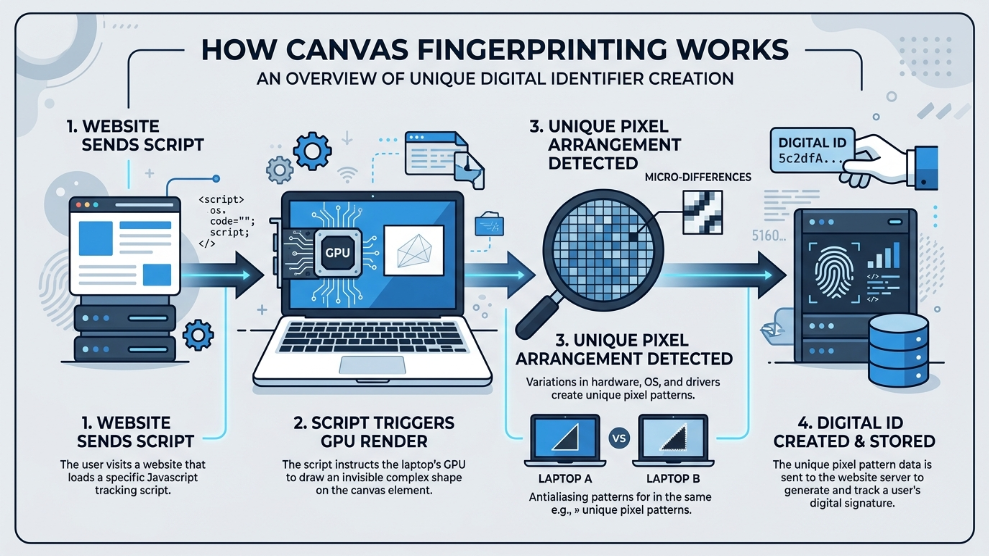
However, tracking companies discovered a highly invasive secondary use for this element. When you visit a website, a hidden script runs in the background, instructing your browser to draw a hidden, invisible line of text or a complex 3D graphic using your computer’s graphics processing unit (GPU).
According to privacy advocates at the Electronic Frontier Foundation (EFF), because every computer has a slightly different combination of graphics cards, operating systems, installed fonts, and driver versions, the <canvas> element will render this invisible graphic slightly differently at the pixel level on every single machine.
The website’s script reads these microscopic pixel differences, hashes the data, and generates a mathematical string. That string is your unique “Canvas Fingerprint.”
Why Standard Blocking is Dangerous
When people learn about this tracking method, their first instinct is to simply block the <canvas> element using a browser extension. While this might stop casual advertisers, it is a fatal mistake for digital professionals.
If you are trying to manage multiple Facebook ad accounts safely, the platform expects your browser to act like a normal human user’s device. If Facebook’s security algorithm tries to run a canvas script and realizes your browser is actively blocking it, a massive red flag is raised. Regular internet users do not block HTML5 canvas elements. Your profile will instantly be flagged as highly suspicious, bot-like, and likely suspended.
How to Professionally Spoof Your Canvas Data
To survive on strict platforms, you cannot block the data; you must spoof it. Spoofing means allowing the website’s script to run, but feeding it completely authentic, yet entirely fabricated, hardware data.
This requires specialized anti-detect software. For basic marketers, many platforms offer tools that add slight “noise” to the canvas output, altering the pixel data just enough to change the fingerprint hash. However, aggressive algorithms can sometimes detect this artificial noise.
For enterprise-level security, marketers use platforms like Multilogin. Instead of just injecting noise, its proprietary browser engines (Mimic and Stealthfox) are engineered at the source-code level to bypass canvas tracking. They ensure that the spoofed canvas data generated by your isolated profile perfectly aligns with a real, logical hardware setup, completely fooling the tracking script without triggering any defensive red flags.
Final Thoughts
Canvas fingerprinting is a stark reminder that simply hiding your IP address is no longer enough to protect your online identity. Your hardware itself is constantly being interrogated by the websites you visit. By understanding the mechanics of this tracking method and utilizing advanced spoofing technologies, you can ensure that your digital operations remain secure, isolated, and completely untraceable by modern algorithms.

Munir is a digital security researcher and software reviewer
with over 5 years of experience testing privacy tools, parental
control applications, and cybersecurity software. He founded
Tech Monitor Pro to provide honest, hands-on reviews that help
families and professionals make smarter decisions about the
tools they use online. When he is not testing the latest VPN
or email verification platform, he writes practical guides on
digital safety and online privacy.