
For years, internet privacy advice has revolved around two basic concepts: clearing your cookies and using a Virtual Private Network (VPN). Most people assume that if they hide their IP address and browse in Incognito Mode, they are completely invisible to trackers, advertisers, and social media algorithms.
Unfortunately, modern tracking technology has evolved far beyond simple IP addresses and cookies. Today, websites use a highly aggressive and virtually invisible tracking method known as Browser Fingerprinting.
If you have ever had an advertising account inexplicably banned, or noticed highly specific ads following you across devices despite using a VPN, you have been fingerprinted. In this guide, we will explain exactly how this tracking method works, what data is being stolen from your computer, and the professional methods required to stop it.
How Does Browser Fingerprinting Work?
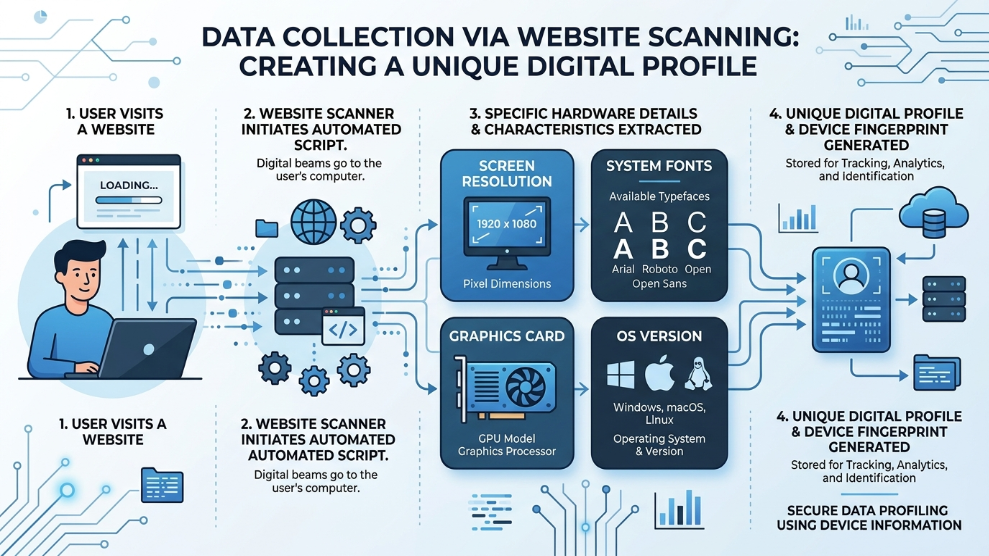
When you visit a website, your web browser does not just ask for the webpage; it hands over a massive amount of technical information to ensure the website loads correctly. The website asks your browser questions like, “What size is your monitor? What fonts do you have installed? What operating system are you running?”
Browser fingerprinting takes all of these seemingly innocent data points and combines them. Because everyone’s computer is slightly different—you might have a unique combination of installed fonts, a specific graphics card driver, and a particular screen resolution—this combination of data creates a mathematical hash. This hash is your “digital fingerprint.”
Even if two million people visit the exact same website, your specific combination of hardware and software variables makes you uniquely identifiable.
The Most Common Fingerprinting Vectors
Websites use several complex scripts to extract this data. The most prominent methods include:
- Canvas Fingerprinting: The website instructs your browser to draw a hidden, invisible graphic using your device’s graphics card (GPU). Because different graphics cards render pixels slightly differently, the resulting image serves as a unique hardware identifier.
- AudioContext Fingerprinting: Similar to Canvas, this script asks your computer to process a low-frequency audio signal. The slight variations in how your computer’s sound card processes the audio create another unique identifier.
- Font and Plugin Enumeration: The website scans your system to see the exact list of fonts and browser extensions you have installed.
Why Incognito Mode and VPNs Fail
A VPN changes your IP address, making it look like you are browsing from another country. Incognito mode ensures that no search history or cookies are saved after you close the window.
However, neither of these tools changes your hardware. If you open Incognito Mode and connect to a VPN, a website’s Canvas fingerprinting script will still detect your exact graphics card and screen resolution. The website’s algorithm will instantly recognize that it is the exact same computer, just using a different IP address.
How to Actually Stop Browser Fingerprinting
If you simply want to reduce casual advertising trackers, you can use privacy-focused extensions like Privacy Badger, or switch to hardened browsers like Brave. These tools block known tracking scripts from executing.
However, if your livelihood depends on managing multiple online identities—such as running several e-commerce storefronts or managing diverse advertising campaigns—simply blocking scripts is dangerous. When a high-security website (like Facebook or Amazon) sees that you are actively blocking Canvas scripts, they flag your profile as highly suspicious and often ban the account.
Instead of blocking the data, the professional strategy is to spoof the data. You need software that feeds the website completely authentic, yet entirely fake, hardware information.
This is achieved using specialized anti-detect environments. For instance, media buyers frequently utilize GoLogin because it allows you to create isolated browser profiles. Each profile is assigned a completely unique set of fonts, Canvas data, and WebRTC parameters. To the website, it looks like a brand new, physical laptop.
For enterprise agencies handling incredibly sensitive client accounts, relying on custom-built infrastructure is often necessary. Advanced platforms like Multilogin modify the browser at the source-code level, ensuring that even the most aggressive algorithmic security checks cannot link your various digital profiles together.
Final Thoughts
Browser fingerprinting is a reminder that the internet is constantly monitoring our digital footprints in ways we cannot easily see. While basic privacy tools offer a false sense of security, understanding how your hardware data is collected is the first step toward true anonymity. By utilizing advanced spoofing technologies, you can reclaim your privacy and ensure your online activities remain strictly your own.

Munir is a digital security researcher and software reviewer
with over 5 years of experience testing privacy tools, parental
control applications, and cybersecurity software. He founded
Tech Monitor Pro to provide honest, hands-on reviews that help
families and professionals make smarter decisions about the
tools they use online. When he is not testing the latest VPN
or email verification platform, he writes practical guides on
digital safety and online privacy.