

📶 Quick Takeaway
Public Wi-Fi is far safer than it used to be, because almost every website now uses HTTPS encryption. The real modern risks are fake networks, fake login pages that ask for your passwords, and phishing, not someone grabbing your bank details out of the air. Stick to HTTPS sites, never ignore a browser security warning, use unique passwords with two factor authentication, and run a VPN for anything sensitive.
You sit down in a cafe, open your laptop, and connect to the free Wi-Fi. For years, security blogs have told you that the moment you do this, a hacker two tables away is grabbing your bank password out of the air. That story used to be true. Today it is mostly outdated.
Here is the honest, current picture. Almost all web traffic now travels over HTTPS, which encrypts the connection between your browser and the website. Because of that, the U.S. Federal Trade Commission now says that connecting through public Wi-Fi is usually safe. That does not mean you can switch your brain off. The danger simply moved. Instead of silently sniffing your data, attackers now trick you into handing it over through fake networks and fake login screens. This guide shows you the risks that still matter and the simple habits that defeat them.
Table of Contents
Is Public Wi-Fi Actually Dangerous?
Years ago, most websites sent data in plain text, so anyone on the same network could read your passwords with simple software. That era is largely over. With HTTPS now covering the vast majority of websites, the connection between you and the site is an encrypted tunnel, and the old style of grabbing data out of the air rarely works.
So the realistic answer is this. For everyday browsing on HTTPS sites, public Wi-Fi is usually fine. The risk is no longer the network listening to your traffic, it is what happens around the connection. That is where you still need to be careful.
The Real Risks That Still Exist
These are the threats that survived the move to HTTPS, and the ones worth your attention.
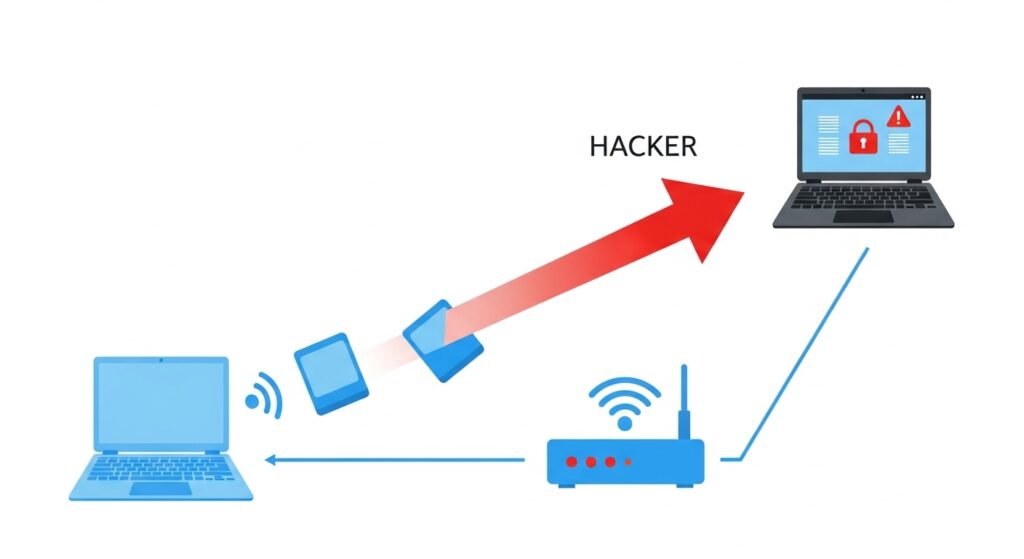
Evil twin and fake hotspots. An attacker sets up a network named something trustworthy like Airport_Free_WiFi or Hotel_Guest. Your phone joins the stronger signal, and now your connection runs through their equipment. They cannot read your HTTPS traffic, but they can serve you fake pages and phishing prompts.
Fake login and captive portals. Some networks show a sign in page before granting access. A malicious one may ask for your Google, Microsoft or Facebook password. No legitimate Wi-Fi ever needs your primary account password. If a portal asks for it, close the tab.
Phishing and the padlock myth. A padlock and HTTPS only mean the connection is encrypted, not that the site is honest. Scammers add HTTPS to their fake sites too. Treat unexpected links and urgent prompts with suspicion even when the padlock is there.
Ignoring browser warnings. If your browser shows a “your connection is not private” message, do not click proceed. That warning is often the only thing standing between you and an attack.
File sharing left open. On a public network, features like Windows network discovery or AirDrop set to everyone can let a stranger push files to your device.
Shoulder surfing. Low tech but real. Someone nearby can simply watch you type a password or read your screen.
How a VPN Helps, and What It Cannot Do
A VPN, or virtual private network, creates an encrypted tunnel from your device to a remote server. On public Wi-Fi it is still genuinely useful, but it is not a magic shield, so it helps to know exactly what it does.
| A VPN does protect you from | A VPN cannot protect you from |
|---|---|
| Packet sniffing and snooping on the network | Typing details into a phishing site yourself |
| The network owner seeing which sites you visit | Malware already on your device |
| An evil twin reading your traffic and metadata | Sites still knowing who you are once you log in |
| Exposing your real IP address and location | Shoulder surfing or a stolen unlocked device |
The takeaway is simple. A reputable paid VPN such as NordVPN is well worth it if you work from cafes, airports and hotels often, because it shuts down the snooping and metadata risks completely. It also pairs naturally with NordPass, since both come from the same security company. Avoid free VPNs, since many fund their servers by logging and selling your browsing data, which defeats the purpose. Turn the VPN on before you join the network, not after.
Our Recommended Protection
Encrypt every public connection with a trusted VPN
A reputable VPN scrambles your traffic the moment you connect, so snoopers and fake hotspots see nothing but useless code.
Get NordVPN →Your Public WiFi Safety Checklist
A VPN is your armor, good habits are your shield. Run through these every time.
✅ Safe Public Browsing Checklist
☐ Confirm the exact network name with staff before joining
☐ Turn off auto connect so your phone does not join networks on its own
☐ Stick to HTTPS sites and never bypass a browser security warning
☐ Never enter your Google, Microsoft or Facebook password into a Wi-Fi login page
☐ Turn off file sharing and set AirDrop to contacts only
☐ Use your phone’s cellular hotspot for banking or anything sensitive
☐ Turn on your VPN before connecting
☐ Log out of accounts when you finish
Two habits do the heavy lifting here. First, use a unique password for every account, so that even if one is exposed, the rest stay safe. A password manager makes this effortless and warns you if a login leaks, and our NordPass review explains why it is our top pick. Second, turn on two factor authentication, ideally with an app or a passkey rather than SMS, so a stolen password alone is useless. Our two factor authentication guide walks through it. If you think a public session may already have compromised your device, see our guide on how to tell if your phone or laptop is infected with malware.

Recommended Security Tools for Public WiFi
These are the tools we recommend to stay safe on the move. You can go straight to the product or read our full review first.
- NordVPN. Your strongest single layer of protection on public networks, from the makers of NordPass. Visit NordVPN. (Swap this for your affiliate link once approved.)
- NordPass. Our top password manager, so one leaked login never unlocks the rest. Read the NordPass review or visit NordPass.
- 1Password. A great option for families and teams. Read the 1Password review.
- Dashlane. A password manager with a built in VPN feature. Read the Dashlane review.
Frequently Asked Questions
Is public WiFi safe now? For everyday browsing on HTTPS sites, it is usually safe, since encryption protects your data in transit. The remaining risks are fake networks and fake login pages that try to trick you, not silent snooping.
Do I really need a VPN on public Wi-Fi? You do not need one for casual HTTPS browsing, but it is well worth having if you use public networks often or handle anything sensitive. It blocks snooping and hides your activity from the network, just remember it does not stop phishing or malware.
Is Wi-Fi with a password safer than open Wi-Fi? Not really. If the password is shared on a sign or receipt, everyone on that network is on the same segment as you, so treat password protected public Wi-Fi the same as open Wi-Fi.
Can someone steal my bank details on public Wi-Fi? Through silent sniffing it is now unlikely, thanks to HTTPS and app encryption. The realistic risk is a fake banking page or login portal you enter details into yourself, so go directly to your bank’s app and never through a link.
Is my phone’s hotspot safer than public Wi-Fi? Yes. Your cellular connection is encrypted by your carrier, you control who connects, so for quick sensitive tasks a personal hotspot is the safer choice.
Does the padlock icon mean a site is safe? No. The padlock and HTTPS only mean the connection is encrypted. Scammers use HTTPS on fake sites too, so the padlock is not proof that the site is trustworthy.
Related guides: How to Tell if Your Phone or Laptop Is Infected With Malware | Two Factor Authentication Explained | Best Encrypted Messaging Apps
Sources used in this article: FTC, Are Public Wi-Fi Networks Safe? What You Need To Know FTC, Public Wi-Fi Networks Security Tips CISA, Mobile Communications Best Practice Guidance

Munir is a digital security researcher and software reviewer
with over 5 years of experience testing privacy tools, parental
control applications, and cybersecurity software. He founded
Tech Monitor Pro to provide honest, hands-on reviews that help
families and professionals make smarter decisions about the
tools they use online. When he is not testing the latest VPN
or email verification platform, he writes practical guides on
digital safety and online privacy.