

Modern smartphones are incredible pieces of technology, capable of capturing 4K video, rendering 3D graphics, and managing multiple social media profiles simultaneously. However, they are designed for bursts of activity, not continuous, 24/7 heavy processing.
If you attempt to run an automated clicking bot, farm a crypto airdrop, or leave an MMORPG running on “auto-battle” overnight, you will quickly notice your physical phone becoming uncomfortably hot. Within a few months, your battery life will plummet, and your phone will begin to lag even during basic tasks.
To prevent destroying expensive physical hardware, automation experts and heavy gamers have completely shifted to virtual infrastructure. Here is the technical breakdown of exactly how cloud phones save your device’s battery and RAM, and why running tasks locally is a massive operational mistake.
The Anatomy of Mobile Resource Drain
To understand the solution, you must understand the problem. When you open a heavy application on your physical smartphone, two primary hardware components take the brunt of the workload:
- Random Access Memory (RAM): Your phone loads the application’s immediate data into its RAM. If you are trying to run multiple accounts simultaneously using app cloners, your RAM fills up completely. When RAM is maxed out, your phone’s operating system begins aggressively killing background apps, causing crashes and system freezes.
- The Processor (CPU/GPU): The processor constantly calculates the app’s logic and renders the graphics. Running a processor at 100% capacity requires a massive amount of electrical power.
The Heat Factor and Battery Degradation
The harder the CPU works, the more power it pulls from the battery. This rapid energy transfer generates extreme heat.
According to mobile hardware analysts at Android Authority, when a physical smartphone gets too hot, it initiates “Thermal Throttling”—intentionally slowing down the processor to prevent the phone from catching fire. More importantly, continuous exposure to high temperatures permanently degrades the chemical composition of lithium-ion batteries. This is what causes batteries to bloat, push against the screen, and eventually require expensive replacements.
The Cloud Computing Solution
How do cloud phones solve this? By completely separating the processing from the display.
When you use a virtual Android environment, the actual operating system, the heavy mobile game, and the automation scripts are not installed on your physical device. They are installed on a massive commercial server in a secure data center hundreds of miles away.
Your local physical phone (or laptop) simply runs a lightweight application that displays a live video feed of the remote server.
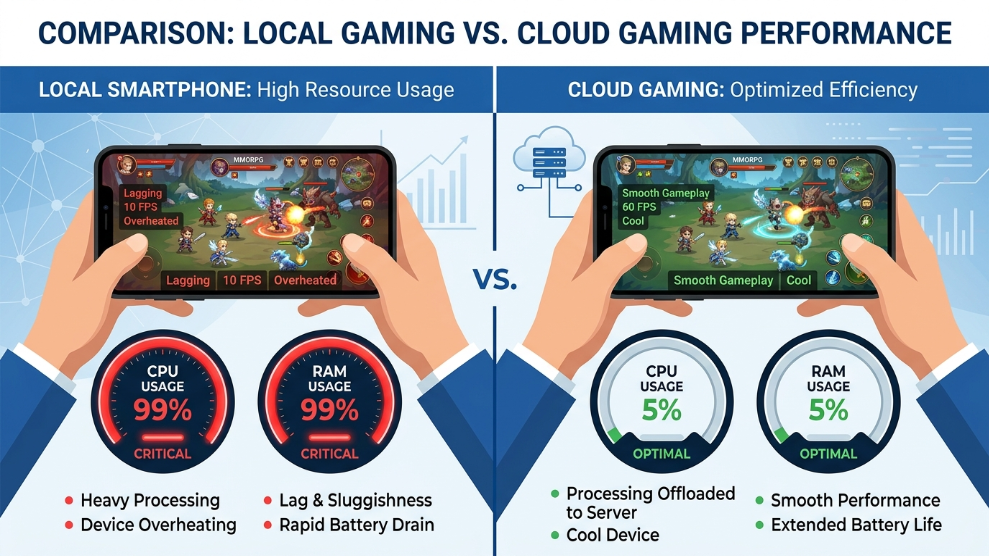
- Zero RAM Usage: Because the heavy application is running on the server’s RAM, your local phone’s RAM remains completely empty and available for your personal use.
- Zero CPU/Battery Drain: The cloud server is doing all the heavy mathematical calculations. Your physical phone is merely decoding a simple video stream, which requires virtually no CPU power. Your battery stays cool, and its lifespan is preserved.
Native Environments and AFK Running
The hardware protection extends far beyond just cooling your device. Because the cloud server has a constant connection to industrial power and high-speed fiber-optic internet, it offers true 24/7 AFK (Away From Keyboard) capabilities.
If you are an app developer or a marketer running complex scripts, utilizing a platform like VMOS Cloud is highly advantageous. Not only does it protect your local hardware, but it provides a rooted, native Android environment. You can set up your automation script, completely power off your physical smartphone, put it in your pocket, and the cloud phone will continue executing the tasks flawlessly on the remote server.
Final Thoughts
Using a $1,000 physical smartphone as a 24/7 farming tool is an incredibly expensive way to ruin premium hardware. The extreme battery degradation and RAM exhaustion will permanently damage your device within months. By offloading heavy processing tasks to a cloud Android phone, you completely protect your local hardware while simultaneously unlocking the ability to run automated campaigns around the clock without interruption.

Munir is a digital security researcher and software reviewer
with over 5 years of experience testing privacy tools, parental
control applications, and cybersecurity software. He founded
Tech Monitor Pro to provide honest, hands-on reviews that help
families and professionals make smarter decisions about the
tools they use online. When he is not testing the latest VPN
or email verification platform, he writes practical guides on
digital safety and online privacy.