

If you spend enough time researching digital marketing, mobile gaming, or automation, you will inevitably hear people talking about “cloud phones.” You might see screenshots of a marketer controlling 50 smartphones simultaneously from their desktop computer, or a gamer leaving a heavy 3D game running 24/7 without their physical phone ever getting warm.
If you are new to this technology, it can sound like science fiction. How can you have a smartphone that does not physically exist in your hand?
In reality, it is a highly practical and rapidly growing sector of cloud computing. If you are looking to scale your digital operations without buying dozens of physical devices, understanding this technology is your first step. Here is the ultimate beginner’s guide to exactly what a cloud Android phone is and how it works.
The Core Concept: A Phone in a Server Rack
To understand a cloud phone, you first need to understand basic cloud infrastructure. According to the technology experts at IBM, cloud computing is the delivery of computing services—including servers, storage, and software—over the internet.
A cloud Android phone applies this exact concept to mobile devices. Instead of holding a plastic and glass phone with a processor and battery inside, the “phone” is actually a piece of software running on a massive, high-powered server in a secure data center.
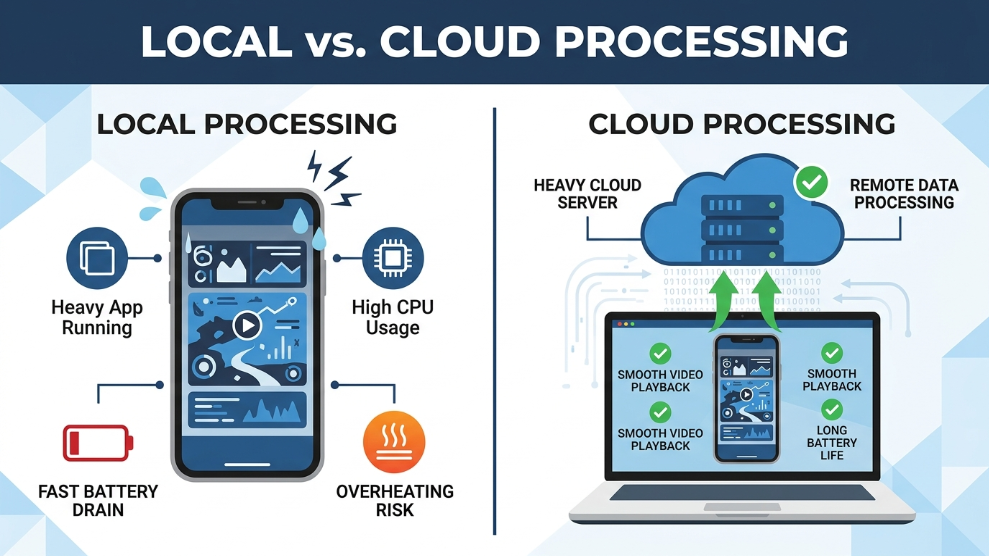
When you purchase a cloud phone subscription, you are renting a small fraction of that server. The provider installs the Android Operating System (OS) on that server slice. You then use an app on your computer or physical smartphone to connect to it. What you see on your screen is essentially a live, interactive video feed of that remote Android device. When you swipe your screen, the command is sent over the internet, the server processes the swipe, and the video feed updates instantly.
Cloud Phones vs. Desktop Emulators
A common misconception is that cloud phones are just like desktop emulators (such as BlueStacks or NoxPlayer). While they look similar, their underlying technology is completely different.
- Desktop Emulators: These programs run locally on your PC. They use your computer’s actual RAM, CPU, and graphics card to simulate an Android environment. If you try to run five emulators at once, your PC will likely freeze or crash due to resource exhaustion.
- Cloud Phones: These run remotely. Because all the processing power, storage, and internet downloading happen on the provider’s server, your local PC does almost zero work. You can run 100 cloud phones on a cheap, 10-year-old laptop because your laptop is only displaying a video stream.
The Main Advantages of Cloud Phones
Why are professionals abandoning physical devices and shifting to the cloud? The advantages are purely operational:
1. 24/7 AFK (Away From Keyboard) Running This is the most powerful feature. Because the phone lives on a server, it is permanently connected to high-speed internet and limitless power. You can open a mobile game, start an auto-farming bot, and then completely turn off your computer. The game will continue running flawlessly in the cloud. This makes platforms like Redfinger Cloud Phone incredibly popular for MMORPG players.
2. Zero Hardware Degradation Running heavy apps 24/7 on a physical phone destroys the lithium-ion battery and causes the processor to overheat. With a cloud phone, you never have to worry about battery swelling, cracked screens, or hardware failures.
3. Instant Scalability and Testing If an app developer needs to test their software on a rooted Android 7 device, they do not need to buy one. They can instantly spin up a custom virtual environment using VMOS Cloud, test the app, and delete the virtual phone five minutes later.
Final Thoughts
A cloud Android phone is essentially a high-performance mobile device that lives on the internet rather than in your pocket. By offloading the hardware requirements to massive data centers, this technology allows marketers, developers, and gamers to run mobile applications 24/7, scale their operations infinitely, and protect their local hardware from exhaustion. If your business relies on mobile apps, transitioning to the cloud is the smartest upgrade you can make.

Munir is a digital security researcher and software reviewer
with over 5 years of experience testing privacy tools, parental
control applications, and cybersecurity software. He founded
Tech Monitor Pro to provide honest, hands-on reviews that help
families and professionals make smarter decisions about the
tools they use online. When he is not testing the latest VPN
or email verification platform, he writes practical guides on
digital safety and online privacy.