

Mobile gaming is no longer just about casual puzzles. Today, heavy 3D MMORPGs, strategy games, and Web3 crypto games require massive amounts of grinding. To stay competitive, players often need to leave their characters “auto-farming” or mining resources for 12 to 24 hours a day.
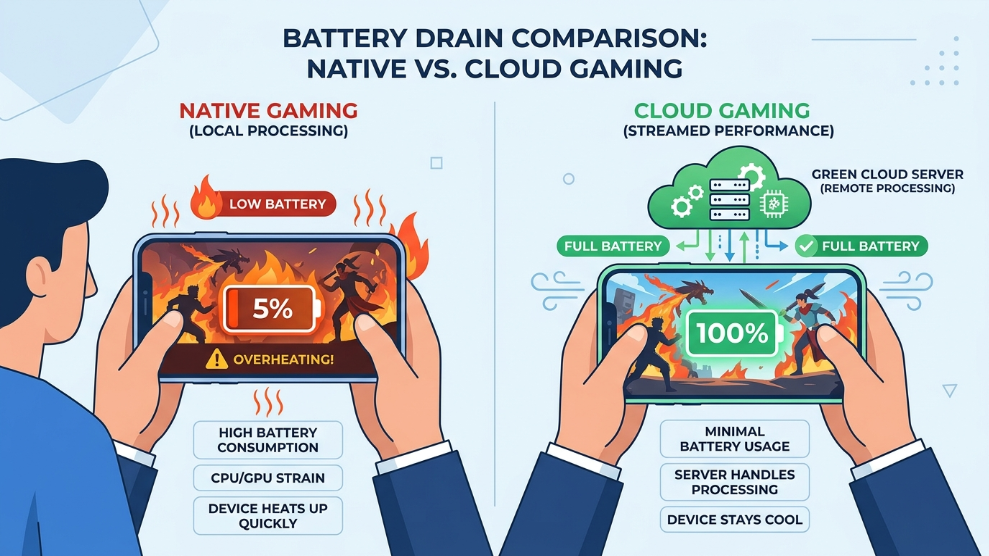
If you attempt to do this on your physical smartphone, the results are catastrophic. According to hardware experts at Android Authority, running heavy 3D applications continuously generates extreme heat, which permanently degrades your lithium-ion battery and can cause screen burn-in.
To solve this, professional gamers and app automation enthusiasts turn to cloud infrastructure. Among the various solutions available, Redfinger has emerged as one of the oldest and most trusted platforms specifically optimized for 24/7 AFK (Away From Keyboard) gaming. In this comprehensive Redfinger Cloud Phone review, we will evaluate its performance, latency, and whether it truly is the ultimate cloud companion for mobile gamers.
Redfinger Pricing Overview
Redfinger offers highly competitive pricing, tailored toward users who need to rent devices for a month or longer. Their server plans (often categorized by V-series or K-series depending on the region) scale based on the computing power required.
| Plan Type | Monthly Cost (Approximate) | Key Features Included |
| Standard / Basic | ~$9.95/mo | Basic Android environment, ideal for 2D games and simple bots. |
| VIP Device | ~$14.95/mo | Higher RAM, optimized for standard 3D MMORPGs and AFK farming. |
| SVIP / Premium | ~$19.95/mo | Maximum processing power, low-latency streaming, large storage. |
| Long-Term Plans | Varies | Significant discounts (up to 30%) for 6-month or yearly subscriptions. |
Click here to check current Redfinger server availability and pricing
Key Specifications
| Feature | Specification Details |
| Operating System | Android 8.1 / Android 10 |
| AFK Capability | True 24/7 background running |
| Cross-Platform | Windows Client, Android App, Web Browser, iOS (via Web) |
| Root Access | Supported (on specific server models) |
| App Compatibility | Google Play Store pre-installed |
| Data Security | Cloud-based encrypted storage |
Detailed Technical Features
True 24/7 AFK Cloud Processing
The core selling point of Redfinger is its flawless background execution. When you download a 10GB mobile game inside the Redfinger environment, it downloads to their high-speed cloud servers, completely bypassing your local Wi-Fi and storage.
Once you log into the game and set your character to auto-farm, you can completely close the Redfinger application. You can turn off your PC, power down your physical smartphone, and go to sleep. Because the virtual phone exists in the cloud, it never loses internet connection, never runs out of battery, and keeps your game running 24/7 without interruption.
Cross-Platform Accessibility
While tools like VMOS Cloud are excellent for root-level tinkering and specific app testing, Redfinger shines in its accessibility. It offers a dedicated Windows client, a native Android APK, and—crucially for Apple users—a seamless Web browser interface that works perfectly on iOS. You can start your farming bot on your desktop PC at home, and then seamlessly check in on the cloud phone using your iPhone while riding the train, without dropping the session.
Resource Allocation and Latency
Cloud gaming is notoriously difficult due to input lag. Redfinger addresses this by utilizing powerful server nodes located in multiple global regions (such as the US, Taiwan, and Singapore). By connecting to the server closest to your physical location, input latency is minimized. While it might not be suitable for competitive e-sports shooters like PUBG Mobile (where millisecond reactions matter), the latency is completely unnoticeable for strategy games, gacha games, and MMORPGs.
Who is Redfinger Best For?
Redfinger is the ultimate platform for Mobile Gamers, Crypto Airdrop Farmers, and Social Media Automators who need an application to run continuously without destroying their physical hardware.
If you play games like Ragnarok M, Lineage 2, or use automated clicking bots that require the screen to remain active for days at a time, Redfinger is an absolute necessity. However, if your goal is managing 100 synchronized phones for an enterprise marketing agency, a platform specifically built for synchronous group control like BitBrowser Cloud Phone might be a better operational fit.
Pros of Redfinger
- ✓ 100% native 24/7 AFK running preserves your physical battery.
- ✓ Frees up your local storage (games install directly to the cloud).
- ✓ Excellent cross-platform support, including iOS via web browser.
- ✓ Google Play Store comes pre-installed and fully functional.
- ✓ Highly stable servers with minimal downtime.
- ✓ Very affordable for long-term (yearly) subscribers.
Cons of Redfinger
- ✗ Minor input latency makes it unsuitable for competitive, fast-paced shooters.
- ✗ Purchasing multiple devices can become expensive without volume discounts.
- ✗ Customer support response times can vary depending on your time zone.
Final Verdict
Redfinger has perfected the art of virtual mobile gaming. By offloading the heavy processing, battery drain, and storage requirements to secure cloud servers, it allows users to farm, bot, and play indefinitely. If you are tired of your physical phone overheating or losing progress due to sudden connection drops, Redfinger Cloud Phone is the most reliable, cross-platform solution available today.
Start AFK Farming With Redfinger Cloud Phone

Munir is a digital security researcher and software reviewer
with over 5 years of experience testing privacy tools, parental
control applications, and cybersecurity software. He founded
Tech Monitor Pro to provide honest, hands-on reviews that help
families and professionals make smarter decisions about the
tools they use online. When he is not testing the latest VPN
or email verification platform, he writes practical guides on
digital safety and online privacy.