

When it comes to digital isolation and bypassing algorithmic tracking, BitBrowser is already a heavyweight in the desktop anti-detect space. However, as social media algorithms increasingly favor mobile-first engagement (especially on platforms like TikTok, Instagram, and Web3 mobile DApps), the company has aggressively expanded into the virtual mobile infrastructure market.
Running one or two virtual Android environments is relatively straightforward. But what happens when your agency lands a client that requires managing 100 different mobile storefronts, or when you need to participate in a massive mobile crypto airdrop across 50 wallets? Managing each phone individually becomes a logistical nightmare.
This is where BitBrowser’s Cloud Phone solution steps in. Built specifically for high-volume users, it focuses on bulk management, deep device spoofing, and simultaneous automation. In this comprehensive BitBrowser Cloud Phone review, we will test its capabilities and see if it truly deserves a spot in your automation arsenal.
BitBrowser Cloud Phone Pricing Overview
BitBrowser’s pricing model is highly modular, allowing you to purchase exact computing tiers based on the heaviness of the apps you intend to run. Bulk discounts are heavily incentivized.
| Plan Type | Monthly Cost (Approximate) | Key Features Included |
| Basic Device | ~$8.00/mo | 2GB RAM / 16GB ROM, basic social media apps. |
| Pro Device | ~$12.00/mo | 4GB RAM / 32GB ROM, optimal for heavy automation. |
| Max Device | ~$18.00/mo | 6GB RAM / 64GB ROM, perfect for 3D games and heavy DApps. |
| Enterprise Fleet | Custom Quote | 100+ Devices, dedicated IP pools, priority server allocation. |
Click here to explore BitBrowser Cloud Phone packages and volume discounts
Key Specifications
| Feature | Specification Details |
| Operating System | Android 7.0 / Android 9.0 / Android 10 |
| Synchronous Control | Yes (Control dozens of phones from one master screen) |
| Hardware Spoofing | Deep IMEI, MAC, and GPS modification |
| Automation Access | ADB (Android Debug Bridge) native support |
| Network Integration | Custom proxy assignment per device |
| Platforms Supported | Windows Desktop Client |
Detailed Technical Features
The Power of Synchronous Group Control
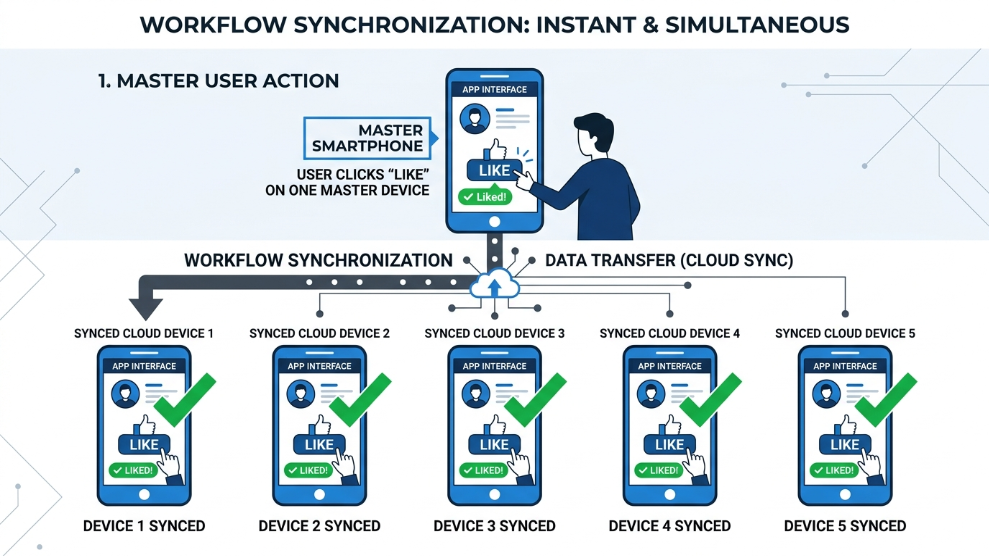
The absolute standout feature of the BitBrowser Cloud Phone is its synchronous control system. If you are farming an airdrop or warming up social media accounts, doing the same repetitive task across 50 phones is exhausting.
With BitBrowser, you can designate one cloud phone as the “Master” device. You then highlight 49 other phones and click “Synchronize.” From that moment on, every swipe, tap, and keyboard stroke you make on the Master phone is instantly and flawlessly replicated across all 49 slave devices. You can literally install an app, create an account, and process a transaction across 50 phones in the exact time it takes to do it on one.
Deep Hardware Spoofing and Proxy Integration
Because BitBrowser’s roots are in anti-detect browser fingerprinting, their cloud phones inherit military-grade hardware spoofing. Before you launch a virtual device, you can generate a completely unique hardware footprint. This includes a unique IMEI number, a specific Android Build ID, a customized MAC address, and a spoofed GPS location.
Furthermore, unlike basic emulators that share your PC’s internet connection, BitBrowser allows you to assign a dedicated SOCKS5 or HTTP proxy to each individual cloud phone. To the tracking algorithms, your 50 virtual devices look like 50 physical smartphones scattered across completely different cities and mobile carrier networks.
Developer-Ready ADB Support
For advanced marketers and coding experts, manual synchronization is not always enough. Sometimes, you need to run completely headless, coded scripts. According to the official Android Developers documentation, the Android Debug Bridge (ADB) is a versatile command-line tool that lets you communicate with a device. BitBrowser Cloud Phones provide direct, open ADB ports for every instance. This allows you to connect your own custom Python scripts or RPA software (like Appium) directly to the cloud farm for 100% automated, 24/7 operations.
Who is BitBrowser Cloud Phone Best For?
BitBrowser Cloud Phone is the ultimate tool for high-volume automation agencies, massive crypto airdrop farmers, and bulk social media managers. If your operation requires running 20, 50, or 100+ mobile instances simultaneously, the synchronous group control feature will save you hundreds of hours of manual labor every single month.
However, if you are a casual user who just wants to run a single secondary WhatsApp account or test one app, the complex desktop client and deep spoofing features might be overkill. For simple, single-device needs, a more straightforward platform might be a gentler introduction to cloud phones. But for serious scalers, BitBrowser is unmatched.
Pros of BitBrowser Cloud Phone
- ✓ Flawless Synchronous Control allows managing dozens of devices with one click.
- ✓ Deep, customizable hardware spoofing (IMEI, MAC, Android ID).
- ✓ Dedicated proxy assignment for each individual cloud phone.
- ✓ Native ADB support for advanced programmatic automation.
- ✓ Highly stable Windows desktop client designed for bulk management.
- ✓ Excellent tiered pricing model with significant bulk discounts.
- ✓ 24/7 AFK running ensures bots never sleep.
Cons of BitBrowser Cloud Phone
- ✗ The user interface is highly technical and requires a learning curve.
- ✗ Focused strictly on the Windows desktop client (limited web/mobile management).
- ✗ Setting up synchronous control properly requires high-speed, stable internet.
Final Verdict
BitBrowser Cloud Phone is not just an emulator; it is an industrial-scale mobile infrastructure tool. By perfectly blending their renowned anti-detect spoofing technology with powerful bulk management and synchronous control features, they have created a platform that turns a single marketer into a massive, automated workforce. If scaling your mobile operations is your primary goal, BitBrowser provides the heavy-duty engine required to get you there safely.
Scale Your Mobile Operations With BitBrowser Today

Munir is a digital security researcher and software reviewer
with over 5 years of experience testing privacy tools, parental
control applications, and cybersecurity software. He founded
Tech Monitor Pro to provide honest, hands-on reviews that help
families and professionals make smarter decisions about the
tools they use online. When he is not testing the latest VPN
or email verification platform, he writes practical guides on
digital safety and online privacy.