

If you have ever tried to scale a mobile automation business, you already know the physical nightmare of traditional “phone farming.”
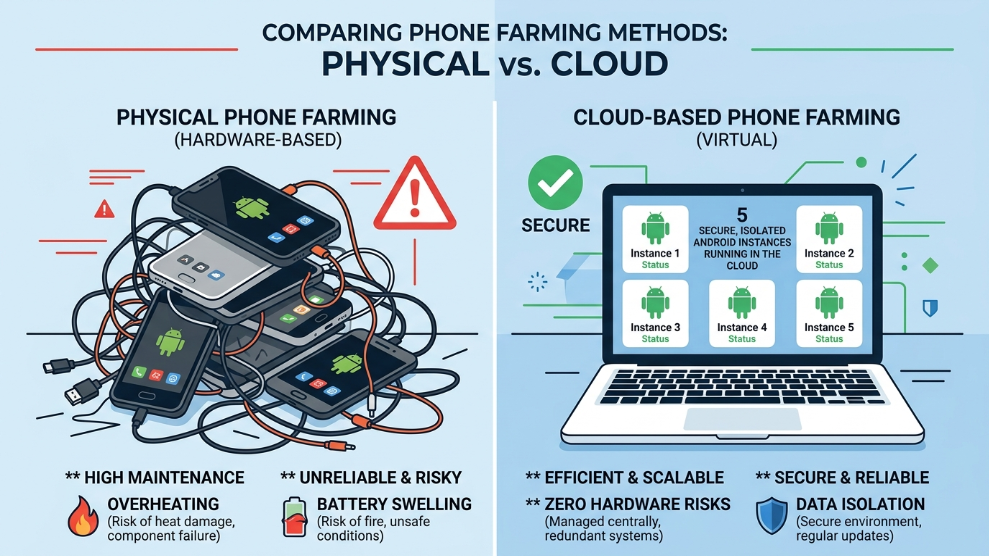
Buying dozens of cheap Android phones to run TikTok automation, crypto airdrop bots, or mobile game farming sounds like a great idea until you actually plug them in. Within a month, the batteries start swelling, the processors overheat, screens crack, and managing the tangled mess of charging cables becomes a full-time job.
The digital marketing and automation industry has largely moved past physical hardware and transitioned into the cloud. Having personally tested several virtual environments to automate mobile workflows, I have seen the massive difference cloud infrastructure makes. In this hands-on VMOS Cloud review, we will explore why this specific platform has become the go-to solution for mobile marketers, app testers, and automation experts.
VMOS Cloud Pricing Overview
VMOS (Virtual Machine Operating System) offers highly flexible pricing. Unlike buying physical hardware, you can rent a high-performance cloud phone for a few days, a month, or a full year, scaling your farm up or down instantly.
| Plan Type | Duration | Key Features Included |
| VIP Daily Trial | 1-3 Days | Perfect for quick app testing, basic Android environment. |
| VIP Monthly | ~$9.90/mo | Standard cloud phone, 24/7 AFK running, pre-installed root. |
| SVIP Monthly | ~$14.90/mo | Premium servers, higher RAM/Storage, zero lag for gaming. |
| SVIP Yearly | ~$120.00/yr | Massive discount for long-term automation and phone farming. |
Click here to check current VMOS Cloud pricing and start your virtual farm
Key Specifications
| Feature | Specification Details |
| Operating System | Android 7.1 / Android 9.0 (Customizable) |
| Root Access | Pre-installed 1-click Root |
| Framework Support | Native Xposed Framework support |
| Uptime capability | 24/7 AFK (Runs even when your local device is off) |
| Multi-Instance | Yes (Run dozens of cloud phones simultaneously) |
| Platforms Supported | Windows, Web Browser, Android OS |
Detailed Technical Features
1-Click Root and Xposed Framework
The biggest limitation of buying a physical phone for automation is the complex process of “rooting” the device to gain administrative control. Without root access, you cannot spoof your GPS location or change your device ID.
According to mobile development experts at XDA Developers, gaining root access allows for deep system modifications that standard users cannot perform. VMOS Cloud makes this incredibly easy. Every virtual phone comes with a simple toggle switch to enable Root access and the Xposed Framework. This allows marketers to instantly install modules that change the phone’s IMEI number, spoof its GPS to a different country, and bypass mobile app tracking restrictions without voiding any warranties or bricking physical devices.
24/7 AFK (Away From Keyboard) Running
This is the feature that makes VMOS an absolute powerhouse for phone farming. When you install an app on VMOS Cloud—whether it is a crypto mining node, a social media auto-liker, or an MMORPG game—it runs on their remote servers, not your local hardware.
You can launch the bot, close the VMOS app, turn off your actual computer or physical phone, and put it in your pocket. The virtual Android phone in the cloud will continue running 24 hours a day, 7 days a week, without draining a single percentage of your battery or using your local RAM.
Flawless Multi-Instance Management
If you are trying to run multiple TikTok accounts safely, doing it from a single mobile device will result in a shadowban. With VMOS Cloud, you can purchase 10 different virtual cloud phones. Through their desktop client, you can view and control all 10 screens simultaneously. Each virtual phone acts as a completely isolated environment, ensuring your accounts never cross-contaminate.
Who is VMOS Cloud Best For?
VMOS Cloud is designed for Automation Marketers and Crypto Farmers. If you need to run mobile-only applications 24/7 without burning down your house with overheating lithium-ion batteries, this is the safest and most scalable infrastructure you can buy.
It is also an incredible tool for App Developers and Penetration Testers. Being able to instantly spin up a rooted Android 9 environment, test a potentially malicious APK file, and then instantly delete the cloud instance provides a perfect, risk-free sandbox.
However, if your primary goal is high-end, competitive 3D mobile gaming, the slight latency introduced by cloud streaming might not be suitable for fast-paced shooters like PUBG Mobile.
Pros of VMOS Cloud
- ✓ Eliminates the risk of physical battery swelling and overheating.
- ✓ 24/7 background running even when your local device is powered off.
- ✓ 1-click Root and Xposed Framework come pre-installed.
- ✓ Massive scalability; spin up 50 phones in minutes.
- ✓ Highly affordable compared to purchasing physical smartphones.
- ✓ Cross-platform support (control your cloud phone from PC or mobile).
Cons of VMOS Cloud
- ✗ Requires a stable, fast internet connection for smooth video streaming.
- ✗ Not ideal for competitive, latency-sensitive multiplayer gaming.
- ✗ Lower-tier VIP servers can occasionally experience high loads during peak hours.
Final Verdict
The era of maintaining a chaotic, wire-filled room of cheap physical smartphones is over. In the modern landscape of digital marketing and automation, cloud infrastructure is the only logical way to scale.
VMOS Cloud provides a robust, heavily customizable, and incredibly secure virtual Android environment. Its native root support and true 24/7 AFK capabilities make it an indispensable tool for anyone serious about phone farming, app automation, or mobile asset management.
Build Your Cloud Phone Farm With VMOS Cloud Today

Munir is a digital security researcher and software reviewer
with over 5 years of experience testing privacy tools, parental
control applications, and cybersecurity software. He founded
Tech Monitor Pro to provide honest, hands-on reviews that help
families and professionals make smarter decisions about the
tools they use online. When he is not testing the latest VPN
or email verification platform, he writes practical guides on
digital safety and online privacy.