
When you buy a new computer or smartphone, one of the first things you think about is security. You want to protect your expensive device and your private data from hackers. But the moment you start looking for protection software, you are hit with confusing technical jargon.
You will immediately encounter the great debate: antivirus vs anti malware.
Are they the exact same thing? Does one replace the other? If you buy a premium antivirus, are you still vulnerable to malware? In 2026, the landscape of digital threats has evolved so rapidly that understanding the difference between these two terms is no longer just for IT professionals; it is essential knowledge for everyday internet users.
Cybercriminals are no longer just coding simple viruses to annoy you. They are running highly profitable, organized businesses designed to steal your passwords, lock your hard drives, and monitor your private conversations.
In this comprehensive guide, we will break down the exact differences between antivirus vs anti malware, explain how modern threats operate, and give you a clear answer on whether you need to run both programs simultaneously to keep your digital life safe.
Understanding the Terminology: What is Malware?
To solve the “antivirus vs anti malware” confusion, we first need to define the root word.
Malware is a broad umbrella term. It stands for “Malicious Software.” Any piece of code or software that is designed to harm, exploit, or secretly monitor a computer network or device is considered malware.
Underneath this massive umbrella of malware, there are dozens of different specific types of threats. Here are the most common:
- Viruses: A specific type of malware that attaches itself to clean files and infects other clean files. They can spread uncontrollably and damage a system’s core functionality.
- Spyware: Software designed to hide in the background and secretly record your passwords, keystrokes, and browsing history.
- Ransomware: A devastating attack that encrypts your entire hard drive, demanding you pay a ransom to unlock your own files.
- Adware: Aggressive software that spams your screen with unwanted, malicious advertisements.
Therefore, a virus is simply one specific category of malware. All viruses are malware, but not all malware is a virus.
What Does Traditional Antivirus Do?
Historically, traditional Antivirus (AV) software was built to do exactly what its name suggests: stop viruses.
In the early days of the internet, threats were relatively simple. Hackers created classic viruses, worms, and basic Trojans. Antivirus software worked by maintaining a massive dictionary (called a signature database) of all known viruses. When you downloaded a file, the antivirus would scan it, compare it to the dictionary, and if it found a match, it would quarantine and delete the file.
While this was highly effective ten years ago, traditional antivirus has a major limitation today: it relies on knowing what the virus looks like before it attacks.
If a hacker creates a brand-new, never-before-seen piece of code (known as a “Zero-Day Attack”), a traditional, old-school antivirus program might let it pass right through because it is not in the dictionary yet.
What Does Anti-Malware Do?
If antivirus is the old-school security guard checking ID cards at the front door, Anti-Malware is the highly trained, modern detective analyzing behavior inside the building.
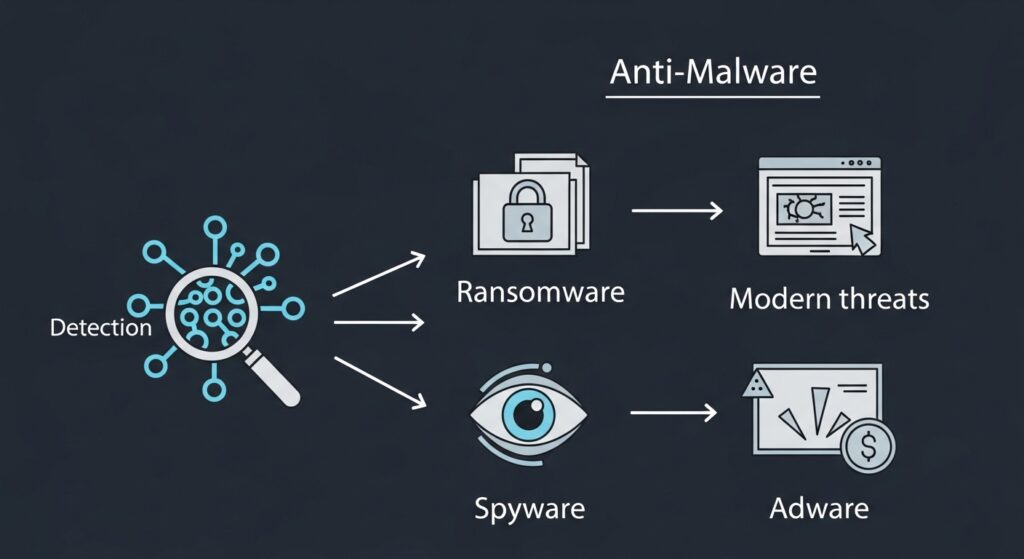
Anti-malware software is designed to combat the newest, most advanced, and most sophisticated threats on the internet—specifically Ransomware, Spyware, and Adware.
Instead of just relying on a dictionary of known threats, anti-malware uses Heuristic Analysis and Artificial Intelligence. It monitors how programs behave. If a seemingly normal program suddenly tries to encrypt all your family photos or secretly tries to record your keyboard strokes, the anti-malware engine flags it as suspicious behavior and shuts it down instantly, even if it has never seen that specific piece of code before.
Independent security testing organizations, like the highly respected AV-TEST Institute, constantly evaluate how well these modern anti-malware engines perform against real-world, zero-day threats.
The Spyware Exception: When Monitoring is Intentional
It is important to note that not all software that tracks behavior is classified as malicious malware. Context matters.
For example, many parents use powerful, legitimate monitoring applications to keep their children safe from cyberbullying. Apps like Eyezy are designed to monitor social media chats and provide location tracking to protect minors. Because these tools are legally purchased and installed by the device owner, they are not classified as malicious spyware by security engines.
However, if someone installs a similar tracking tool on your phone without your knowledge or consent, it crosses the line into malicious Stalkerware. A good anti-malware program will often alert you if hidden tracking software is running on your device. (If you suspect someone is tracking you, learn how to run a deep scan in our guide: How to Tell if Your Phone or Laptop is Infected with Malware).
The Final Answer: Do You Need Both?
So, in the battle of antivirus vs anti malware, which one should you choose? Do you need to buy and install two separate, heavy programs on your computer?
In 2026, the answer is: You need both functionalities, but you do not need two separate apps.
The cybersecurity industry has merged. Today, almost every premium security product on the market (like Bitdefender, Norton, or Malwarebytes) is a hybrid. They include both the traditional “signature-based” antivirus scanning to catch older, known threats, AND the modern, AI-driven anti-malware engines to catch ransomware and zero-day attacks.
Running two separate, dedicated security programs at the same time is actually a bad idea. They will often fight with each other, consume massive amounts of your computer’s memory, and slow your system down to a crawl.

Conclusion: Secure Your Digital Foundation
The days of relying on free, basic antivirus software are long gone. The internet is simply too dangerous.
When evaluating antivirus vs anti malware, understand that you are no longer choosing between the two. You are looking for a unified, comprehensive security suite. When shopping for protection in 2026, ignore the outdated labels. Look for software that explicitly promises “Real-time Threat Protection,” “Ransomware Remediation,” and “Heuristic Analysis.”
By installing a modern, all-in-one security suite, maintaining strong passwords, and avoiding suspicious downloads on Public Wi-Fi networks, you build an impenetrable digital fortress around your personal data. Do not wait for a cyberattack to happen; secure your devices today.

Munir is a digital security researcher and software reviewer
with over 5 years of experience testing privacy tools, parental
control applications, and cybersecurity software. He founded
Tech Monitor Pro to provide honest, hands-on reviews that help
families and professionals make smarter decisions about the
tools they use online. When he is not testing the latest VPN
or email verification platform, he writes practical guides on
digital safety and online privacy.